Does Grok Search the Web? Yes — Here's How (2026)
Yes — Grok searches the web live and reads real-time X posts. How Grok's search and DeepSearch work, what index it uses, the xAI API, and how to get cited.

On this page

Yes, Grok searches the web, and it does something none of the other big assistants do: it also reads live posts on X. That second part is the whole point of Grok, and it's why people keep typing "grok web" and "grok search" into search bars. They want to know what Grok web search is actually looking at when it answers.
So let me lay it out plainly.
Curious how your site does?
See how AI engines describe your site — free, about 60 seconds, no signup.
Does Grok search the web in real time?
It does. Grok has a web search tool that lets it search the internet and open pages mid-answer, the same way a person would. Grok 4 was trained with reinforcement learning to use tools, so it doesn't just run one canned search. It picks its own queries, reads what comes back, and keeps digging if the question is hard. Ask it about something that happened this morning and it will go find out rather than shrug at a knowledge cutoff.
That tool-use habit runs through the whole current lineup. Grok 4 is the reasoning flagship; the Grok 4.x "Fast" models were trained end-to-end for tool use and are xAI's best tool-callers; Grok 4.5 is the newest and most capable model as of mid-2026. There's also Grok 4 Heavy, a multi-agent version that runs several copies in parallel on the hardest problems. Different sizes, same instinct: reach for live search when the question needs it.
The model decides for itself when a question needs a search and when it can answer from memory. You don't have to flip a "search mode" switch the way you sometimes do elsewhere.
How Grok's web and X search actually works
Grok doesn't search on a fixed "look it up, then answer" script. It runs an agentic loop, and understanding that loop explains why its answers feel current.
Here's the shape of it. You ask a question. Grok judges whether it can answer from training or needs something live. If it needs live data, it writes its own search queries and can reach for two tools at once: web_search for the open web and x_search for real-time posts on X. It reads what comes back, and — this is the key part — if the first pass isn't enough, it fires off follow-up searches shaped by what it just learned. Then it writes a single answer with the sources cited inline. While it works, you see live status rows (a "Searching the web" step, a "Searched X" step) and, at the end, numbered citations linking back to what it read.
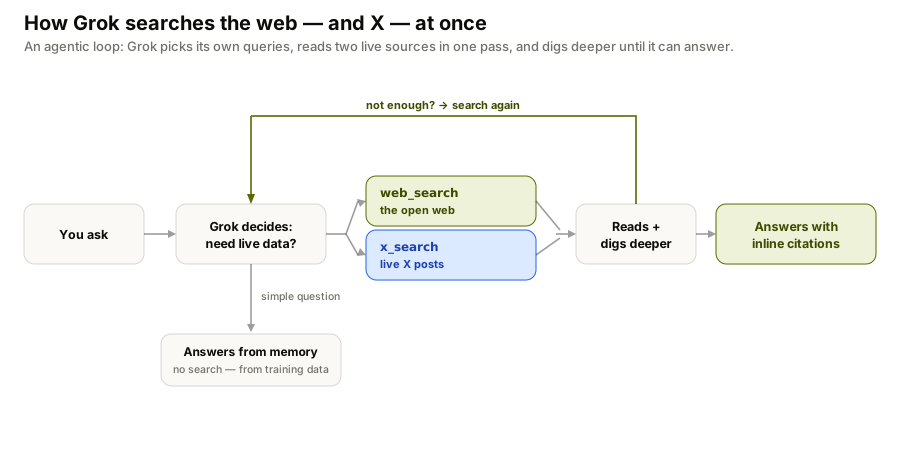
The two-tool part is what makes Grok different. Claude and ChatGPT search the web; Grok searches the web and the live conversation on X in the same pass, then blends them into one answer. It can even pull in a third tool — a code interpreter — inside the same turn if the question needs math or data crunching.
Grok's real edge: live X posts
Here's what makes Grok search different from Claude or ChatGPT. On top of normal web search, Grok can pull real-time public posts from X (formerly Twitter), because xAI and X are the same house. This isn't scraping — it's a first-party, native connection to X's live stream, exposed to the model (and to developers) as the x_search tool. It can search X by keyword, by meaning, by handle, or pull a whole thread, and it can even read images and video in those posts.
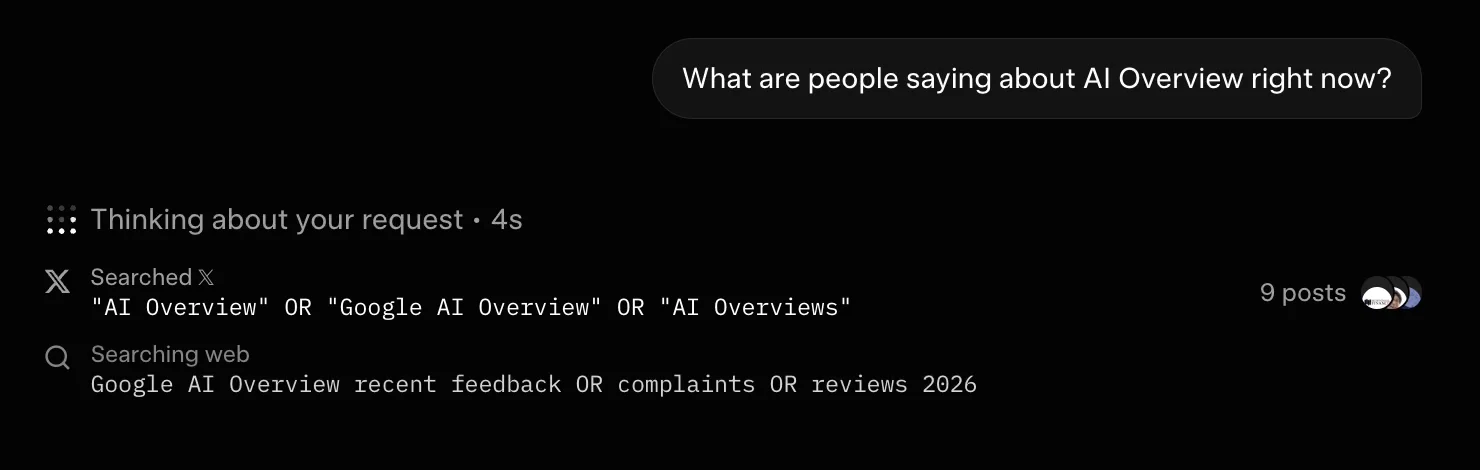
A real Grok answer in action: for a "what are people saying right now" query, it searches X (9 posts) and the web in the same pass.
That matters for a specific kind of question. "What are people saying about this product launch right now?" or "how is this news being received?" are questions a normal web index answers slowly, because it takes time for articles to get written and crawled. X posts are instant. This is the real gap between frozen training data and a live stream:
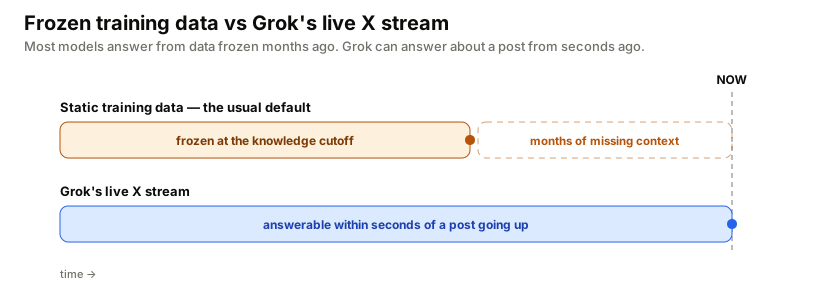
Grok reading X live means it can tell you the mood of a conversation while it's still happening. For breaking news, sentiment, and anything culture-shaped, that's a real advantage. For a careful factual answer, it's also a risk, because live posts are noisy and unverified, and Grok will sometimes repeat that noise. Treat its web citations as the load-bearing sources and its X reads as the pulse of the room.
Fast, Expert, Heavy: Grok's modes (and where DeepSearch went)
Grok has more than one speed, and the controls changed recently — so here's what's actually there now. On grok.com you pick a mode: Auto decides for you, Fast answers quickly, Expert thinks longer and does the heavy, multi-step research (searching the web and X, following links, iterating), and Heavy — a multi-agent "team of experts" — is reserved for the top SuperGrok Heavy plan.
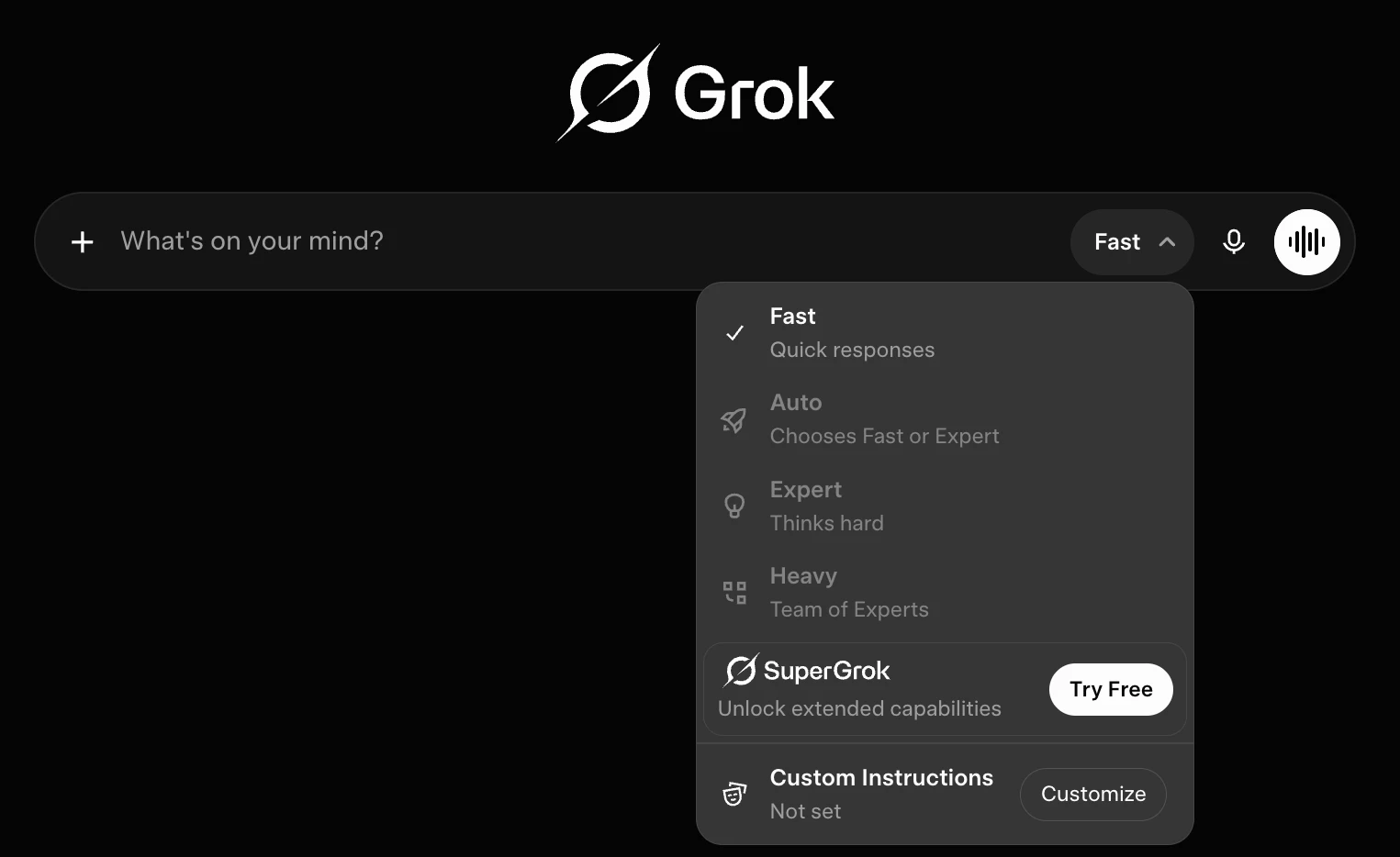
grok.com's mode selector today: Fast, Auto, Expert, and Heavy — and no separate DeepSearch button.
If you remember Grok's separate DeepSearch, DeeperSearch, and Think buttons, you're not misremembering — xAI removed those labels around mid-2025 and folded the deep-research behavior into these modes. The agentic research didn't disappear; it moved. For a quick fact, Fast (or Auto) is fine; for a "map the whole landscape for me" answer, pick Expert — or Heavy, if you're on SuperGrok Heavy.
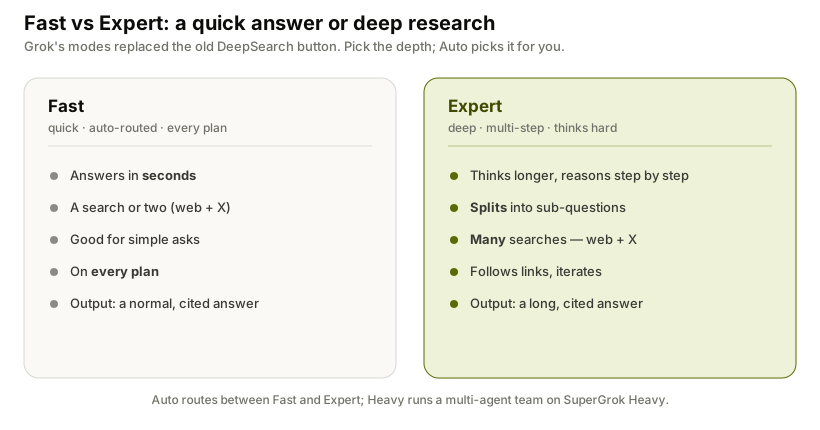
Which mode you can reach depends on your plan. Fast, Auto and Expert are broadly available; Heavy (the multi-agent mode) needs SuperGrok Heavy — reported around $300/mo, versus roughly $30/mo for SuperGrok and about $10 for SuperGrok Lite. Those numbers move around, and free access is more limited, so check xAI's current plans rather than trusting a figure in a blog.
Is Grok a search engine?
Not in the Google sense, and this trips people up. Type a query into Google and you get a page of ten blue links to pick from. Grok doesn't do that. It runs its own real-time web search, adds live X, and hands you a written answer with the sources folded in. It's an answer engine that happens to search, not a search engine that happens to talk.
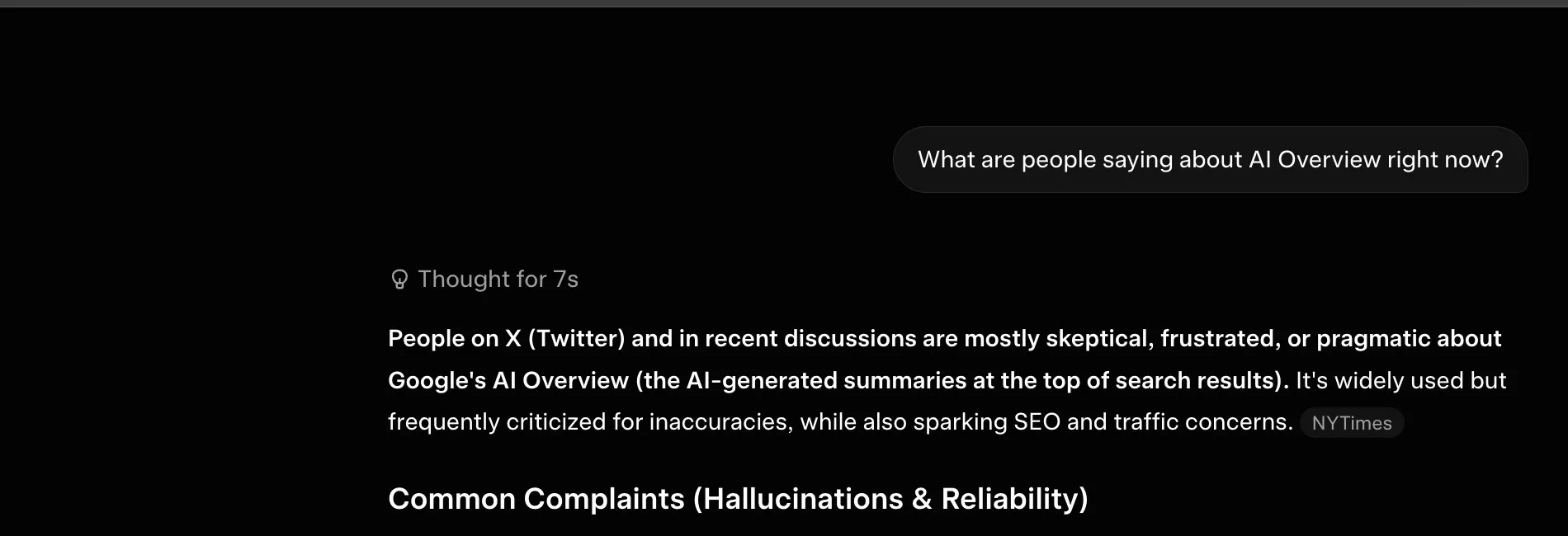
The result: Grok folds X and the web into a single written answer with citations (here, a NYTimes link), instead of returning a list of links.
One honest caveat on the "engine" question: xAI has never disclosed what powers Grok's web search. It's clearly not built on Google's index, and it has that first-party pipe into X — but the web-search backend itself is undisclosed. You may see older articles claim it runs on Bing, or on a search API like Tavily. Those were reports from 2024–2025, xAI never confirmed them, and they may well be out of date. The safe way to say it: Grok reads its own web search plus live X, and the exact web plumbing is a black box.
The practical difference is huge if you run a website. On Google you compete for a rank. With Grok you compete to be one of the few sources it cites inside the answer. There is no second page to be on. You're named, or you're not.
Grok vs Claude, ChatGPT, Gemini, Perplexity: who reads what
Every AI assistant "searches the web," but they don't read the same web — and only one reads the live social feed. That difference decides where your brand can show up.
| Assistant | Live web search | Live X (social) | Shows citations | Web backend |
|---|---|---|---|---|
| Grok | Yes — agentic | Yes — native X | Yes | xAI's own (undisclosed) |
| ChatGPT | Yes | No | Yes | OpenAI's own crawler |
| Claude | Yes | No | Yes | Brave's index (reported) |
| Gemini / AI Overviews | Yes | No | Varies | Google's index |
| Perplexity | Yes | No | Yes | Own crawler + APIs |
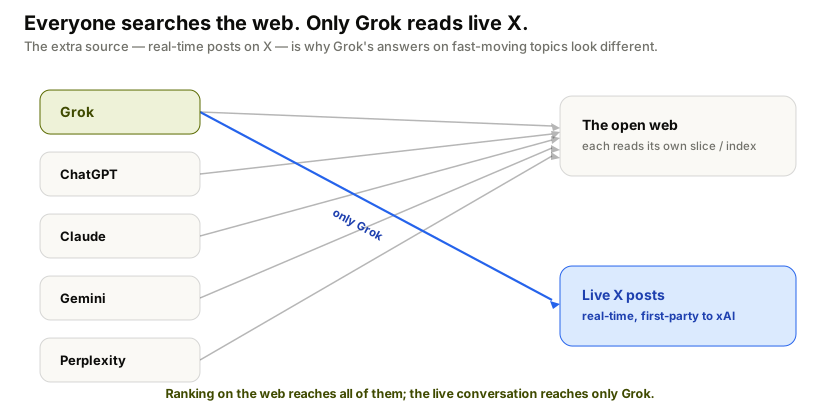
The takeaway: there's no single "AI search" you optimize for once. Google's index feeds Gemini; Bing feeds Copilot; Claude appears to read Brave; ChatGPT and Perplexity mostly crawl their own. Grok is the outlier — it's the only major assistant reading a live social stream, which is exactly why its answers about fast-moving topics look different from everyone else's. For the full field, I compared them in the best AI search engines.
How to use Grok — and build on it
A few ways in:
- grok.com and the X app: chat with Grok directly. Web and X search kick in automatically when your question needs current information; for heavier, multi-step research pick the Expert mode (or Heavy on SuperGrok Heavy) from the mode selector next to the input.
- SuperGrok and X Premium+: Grok's full real-time tool use is bundled into xAI's paid tiers (SuperGrok Lite, SuperGrok, SuperGrok Heavy) and X Premium+. Free access on X exists but is more limited, and the exact caps shift — check xAI's current plans rather than a number in a blog.
For developers: the xAI Agent Tools API
If you build on Grok, live search isn't limited to the chat app. xAI's Agent Tools API gives you server-side built-in tools that run on xAI's own infrastructure — you don't manage search keys or retrieval pipelines. The two that matter here:
web_search— Grok runs its own web searches. You can scope it withallowed_domains/excluded_domains(up to 5) and let it read images.x_search— search live X posts, optionally limited to specific handles (allowed_x_handles) or a date range (from_date/to_date), with image and video understanding.
There's also a code interpreter, document/collection search, and MCP support, and every web-sourced answer comes back with a citations field. One thing to know if you're migrating old code: the standalone "Live Search" API was retired on January 12, 2026 (calls now return HTTP 410) and replaced by these agent tools — so don't wire anything to the old search_parameters field.
What this means if you have a brand
Now connect the dots. Grok is answering buyers' questions by reading the live web and live X, then citing a handful of sources. If your category comes up, somebody gets named. The job is to make sure it's you.
This is Answer Engine Optimization, and Grok has a twist the others don't: because it leans on X, a strong, well-regarded presence on X plausibly helps you with Grok in a way it might not with Claude, which searches through Brave. I went deep on the specifics in how to get cited by Grok.
There's also a crawler question here, and it's messier than for the other engines — so I'll be straight about it. Anthropic publishes named crawlers (ClaudeBot, Claude-User, Claude-SearchBot) you can allow or block cleanly. xAI publishes no such crawler documentation. Bot directories list a GrokBot (and xAI-Bot) user-agent you can add to robots.txt, and doing so is harmless — but independent reporting, including from Cloudflare, says Grok's retrieval traffic often doesn't identify itself and fetches like an ordinary browser, so a robots.txt rule may not actually stop it. The honest takeaway: you can't reliably gate Grok with robots.txt today, and blocking it isn't the goal if you want to be cited anyway. The lever that matters is being a clear, credible source — on the web and on X.
The catch is sharper with Grok than anywhere else: because it reads live X, its answer about you can swing with the conversation. A flurry of posts can move what Grok says this week, and it may not hold next week. You won't know unless you keep checking, and checking by hand across engines doesn't scale. That's the gap FixAEO fills. It runs your buyers' real questions through Grok and seven other engines and tracks who gets cited over time. Run a free scan to see where you stand with Grok today, or wire the data into your own stack with the rank tracking API.
Grok searching the web and X in real time is a gift to small, fast-moving brands. The slow incumbent doesn't automatically win a live conversation. But you have to show up where Grok is looking, and you have to watch the result.
FAQ
Does Grok search the internet?
Yes. Grok has a real-time web search tool that lets it search the internet and read pages while it answers. Grok 4 and the newer Grok 4.x models were trained to choose their own search queries and decide on their own when a question needs a live search.
Does Grok use Google?
No. Grok doesn't present Google's ranked links or rely on Google's index. It runs its own real-time web search and, uniquely, reads live public posts on X, then returns a written answer with citations rather than a list of links. xAI has never disclosed exactly what powers the web-search side.
What search engine or index does Grok use?
xAI hasn't said. Grok clearly has a first-party, live pipe into X posts, and it runs its own web search, but the web-search backend is undisclosed. Older reports tied it to Bing or the Tavily API; those were never confirmed by xAI and may be outdated, so it's safest to treat the backend as a black box.
Can Grok search X (Twitter) posts?
Yes, and it's Grok's signature feature. Because xAI and X are the same company, Grok can pull real-time public X posts (through its x_search tool) to answer questions about breaking news, sentiment, and live conversations — searching by keyword, meaning, handle, or whole thread.
What happened to Grok DeepSearch?
DeepSearch was Grok's agentic deep-research mode — it broke a question into parts, ran many searches across the web and X, followed links, and wrote a longer cited answer. Around mid-2025 xAI removed the separate DeepSearch, DeeperSearch and Think buttons and folded that behavior into its mode selector. Today you get the same deep, multi-step research by choosing Expert (or Heavy on SuperGrok Heavy). The research didn't disappear — the button did.
Is Grok a search engine?
Not in the classic sense. Grok is an answer engine: it searches the web and X, then writes a single answer with sources, instead of returning a page of links to choose from.
Can I stop Grok from reading my site?
Not reliably. Unlike Anthropic's documented crawlers, xAI publishes no crawler docs. You can add a GrokBot/xAI-Bot block to robots.txt, but reporting suggests Grok's fetches often don't self-identify, so the rule may not be honored. Edge or bot rules (for example at your CDN) are a more dependable lever than robots.txt alone — but if you want Grok to cite you, blocking it is the wrong goal.
Is Grok's web search free?
Grok's full real-time search and DeepSearch sit in paid tiers (SuperGrok, X Premium+) and the xAI API. Free Grok on X has more limited access on a lighter model, and the exact limits change often, so check xAI's current plans for what's included.
Related reading
How LLMs Actually Work — and Why It Decides Whether AI Recommends Your Brand
How does ChatGPT decide what to say about your brand? A plain-English guide to next-token prediction, retrieval, and why answers change every time.
26 min readHow to get cited by Grok: the X signal playbook
Grok citations come from X activity, not your blog. This playbook shows which X signals Grok prioritizes and how to build them systematically.
17 min readBest AI Search Engines in 2026: I Tested All 15
I tested 15 AI search engines for a month — Perplexity, ChatGPT, Gemini, Claude, Grok and more. An honest ranking of which to use and what each does best.
37 min readCan Claude Search the Web? How to Enable It (2026)
Yes. Enable Claude web search in three steps, fix a missing toggle on Team or Enterprise, and learn when Claude searches and cites the live web.
15 min readHow to Get Cited by Gemini in 2026
How to get cited by Gemini: it runs on classic SEO plus AI-specific signals. Learn the 2026 playbook for rankings in AI Overviews and Gemini answers.
17 min readAI Search Statistics 2026: How AI Replaces Google
20+ verified, source-linked AI search statistics for 2026 — who uses AI vs Google, how fast it's growing, and the viral stats that don't hold up.
16 min read
Free AEO tools
Put this into practice with free FixAEO tools — no signup required.
AI Visibility Checker
Score your brand across 9 AI engines
AEO Audit Tool
Answer-engine readiness scan
Schema Generator
Build valid JSON-LD structured data
llms.txt Generator
Create a spec-compliant llms.txt
Sitemap Validator
Check your XML sitemap for errors
AI Content Grader
Grade content for AI citation readiness
Find the gap. Then fix it.
Check how AI engines find, describe, and cite your site. Free, no signup. On a paid plan, AI Marketer can turn the evidence into briefs, drafts, optimizations, and reports.