Best AI Search Engines in 2026: I Tested All 15
I tested 15 AI search engines for a month — Perplexity, ChatGPT, Gemini, Claude, Grok and more. An honest ranking of which to use and what each does best.

On this page

A year ago, "search" meant typing keywords into Google and clicking a blue link. In 2026 it means asking a question in plain English and getting a single, synthesized answer — often without ever visiting a website.
That shift created a whole new category of tool: the AI search engine. There are now dozens. Most "best AI search engine" lists are just feature tables copied from each tool's marketing page. So I did the boring thing instead — I actually used all 15 for a month, ran the same questions through each, and ranked them on how good the answers were, whether they cited real sources, and what they're genuinely best for.
One bias I'll declare up front: I work on FixAEO, a tool that measures how brands show up inside these AI answers. That means I stare at the output of these engines all day. It also means I have a take most listicles don't — at the end I'll show you how to check whether any of these engines actually recommend your business. But the ranking below is about using them as a searcher, and it's honest.
Curious how your site does?
See how AI engines describe your site — free, about 60 seconds, no signup.
What is an AI search engine?
An AI search engine is a search tool that uses a large language model (LLM) to read the web and write you a direct, conversational answer — instead of returning a list of ten links to read yourself. The best ones ground that answer in live web results and show citations, so you can verify the claims and click through to the source.
That's the key difference from a normal chatbot: a chatbot answers from memory (its training data) and can be out of date or make things up; an AI search engine retrieves current web pages first, then answers from them, with links. In practice the line is blurring — ChatGPT, Claude and Gemini all now search the web — so this list covers both the purpose-built conversational search engines (Perplexity, You.com) and the general assistants that have become excellent at search.
How I tested
I ran the same set of ~20 real questions through every engine over four weeks — a mix of factual lookups ("what's the cheapest way to ship a pallet from Texas to Ohio"), research questions ("compare the 2026 EV tax credits by state"), shopping questions ("best standing desk under $400"), and a few deliberately obscure ones to test grounding and hallucination.
For each engine I judged five things:
- Answer quality — is it accurate, complete, and well-organized?
- Citations — does it show sources, and are they real and relevant?
- Freshness — can it pull genuinely current information?
- Speed & UX — how fast, and how pleasant to actually use?
- Access — is it free, freemium, or paywalled?
A note on dates: the rankings below reflect testing in June 2026. These products ship fast, so I re-test this list every quarter and update the date above. (Our scoring methodology for brand visibility across these engines is public — see the FixAEO methodology.)
The 15 best AI search engines in 2026
Ranked by how I'd actually reach for them. Short on time? Perplexity for cited research, ChatGPT if you already use it, Claude for deep analysis, and DuckDuckGo if privacy is everything.
One column in the table below matters more than it looks: "Cites sources?" The whole game of AEO is being one of the sources an engine names — so an engine that cites prominently is one worth getting found on.
| # | Engine | Best for | Cites sources? | Access |
|---|---|---|---|---|
| 1 | Perplexity | Cited research | ✅ Prominent, inline | Free · Pro $20/mo |
| 2 | ChatGPT Search | If you already use ChatGPT | ✅ Inline (2–5) | Free, no account |
| 3 | Google AI Mode | Reach / quick answers | ⚠️ Side panel | Free |
| 4 | Microsoft Copilot | Clear source UI + MS apps | ✅ Prominent | Free · Pro $20/mo |
| 5 | Claude | Careful reasoning, long docs | ✅ When web search on | Free · Pro |
| 6 | Grok | Real-time + X/Twitter | ⚠️ Unreliable | Free on X · $30/mo |
| 7 | Meta AI | Casual, in WhatsApp/IG | ⚠️ Light (2–4) | Free |
| 8 | DeepSeek | Cheapest / open-weight | ✅ With search on | Free |
| 9 | Brave Search | Privacy + own index | ✅ In answers | Free · Leo $14.99/mo |
| 10 | DuckDuckGo (Duck.ai) | Maximum privacy | ❌ None (no web search) | Free |
| 11 | You.com | Multi-model + deep research | ✅ Numbered | Free · Pro ~$15/mo |
| 12 | Kagi | Ad-free power search | ✅ Hyperlinked | Paid from ~$5/mo |
| 13 | Komo AI | Private, source-cited | ✅ Numbered + metadata | Free · Premium |
| 14 | Arc Search | Mobile synthesized answers | ✅ Source chips | Free |
| 15 | Wolfram Alpha | Math, data, computation | n/a (computed) | Free · Pro |
1. Perplexity AI — best overall for cited answers
Best for: research and fact-finding where you want sourced, verifiable answers.
Perplexity defined this category and still has the cleanest "answer + citations" experience of anything I tested. You ask a question, it runs a live web search, reads the top results, and writes a short synthesized answer where every claim carries a numbered, clickable source — even on the free tier. That footnote-first design is the whole point: it's built to answer, not to chat, and it treats the open web as the source of truth rather than leaning only on what a model memorized. For anyone doing AEO, that makes it the easiest engine to trust and, in my view, the single most important one to win — if Perplexity cites you, users see your name right next to the fact.
It fits researchers, students, and anyone who wants to check where an answer came from before repeating it. The now-free Comet browser pushes it further, bringing agentic search and Deep Research to everyone instead of keeping them locked up. The catch is the tiering: the headline features — Model Council and the top frontier models — sit behind a pricey $200/mo Max plan, so the most powerful version isn't what most people actually use. The underlying model lineup also shifts constantly, so what's answering you this month may not be what answered last month.
What it's great at:
- Numbered, clickable citations on every claim, free tier included
- Fast synthesized answers grounded in a live web search, not stale memory
- The most transparent "where did this come from" experience of any engine
- The engine that matters most for AEO — a citation puts your brand in front of users
- Comet browser brings agentic search and Deep Research to everyone at no cost
Where it falls short:
- The best features — Model Council, top frontier models — need the $200/mo Max tier
- The model lineup changes often, so behavior isn't stable over time
- It's answer-first, so it's weaker for long open-ended chat or creative work
- Quality still rides on which sources it happens to surface for a query
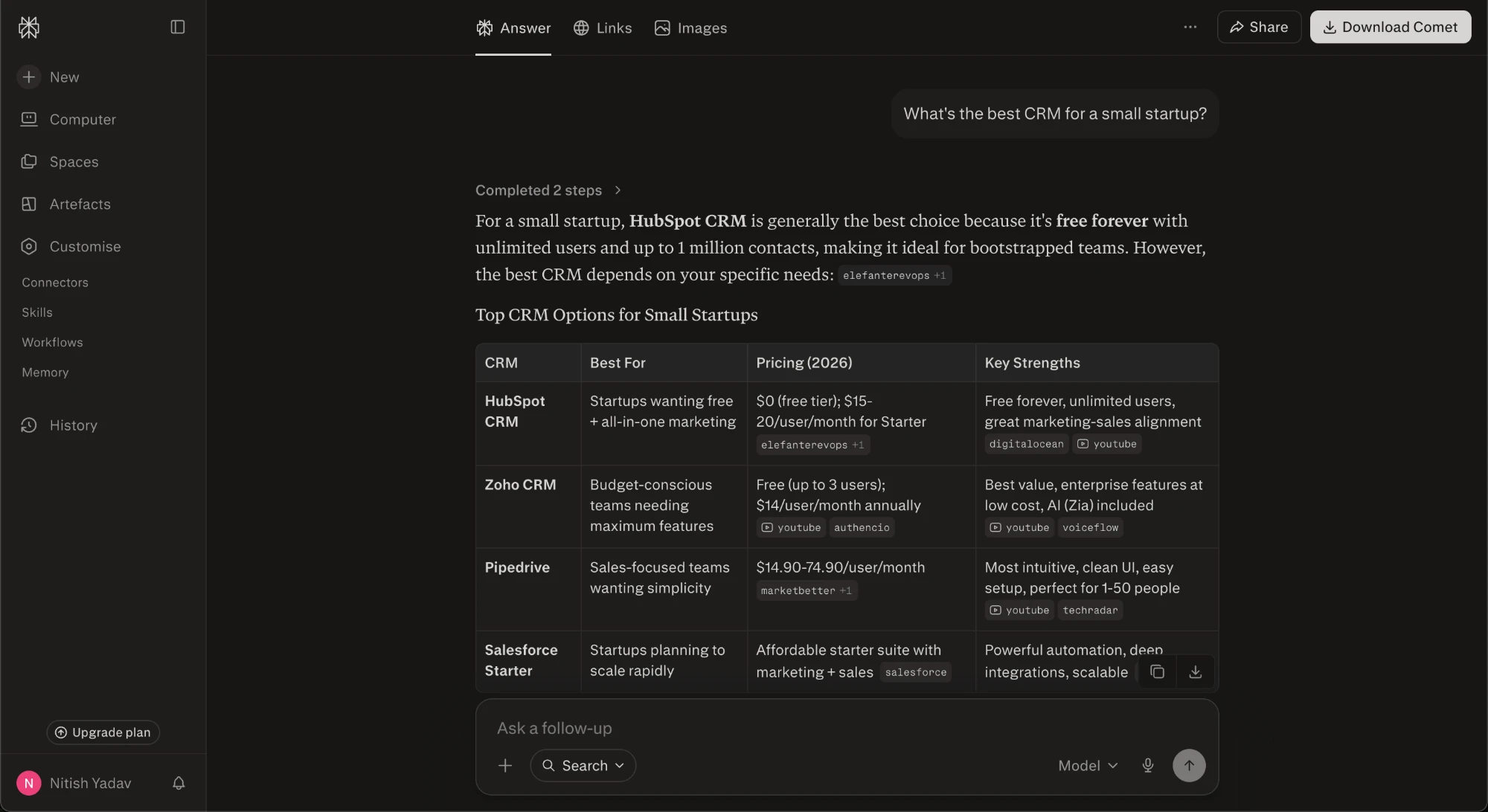
Perplexity answering my test question — every claim carries a clickable, numbered source.
2. ChatGPT Search (OpenAI) — best if you already live in ChatGPT
Best for: conversational, up-to-date answers without leaving the assistant you already use.
ChatGPT now searches the web automatically when a question needs fresh information, so you don't have to flip a toggle or know a special mode — it decides when a query is stale enough to warrant looking things up. It's open to everyone with no account required, which is the part I keep coming back to: most people who "ask AI something" are already in this box, and that reach is simply larger than any dedicated AI-search tool. Under the hood it's a general-purpose assistant that reaches for search when it helps, not a search engine that happens to talk, and you feel that difference — it's as comfortable rewriting an email as it is pulling a current stat.
Answers are well-synthesized with hover-to-verify inline citations, usually 2–5, so you can check a claim against its source without leaving the reply. Deep Research goes further: it compiles structured, cited reports you can scope to trusted sites, which is genuinely useful when you want a real writeup instead of a quick answer. Honestly, the citations are sparser and less prominent than Perplexity's — you get fewer of them and they sit quietly inline rather than front-and-center. But for most everyday questions that trade-off is fine, and the zero-friction distribution is unmatched.
What it's great at:
- Reaching an enormous audience with no login, install, or setup
- Deciding on its own when a question needs live web data
- Synthesizing messy sources into a clean, readable answer
- Hover-to-verify inline citations you can spot-check in place
- Deep Research reports you can scope to sites you trust
- Handling the full range of tasks around a query, not just search
Where it falls short:
- Fewer citations than Perplexity, and easier to overlook
- Sources take a back seat to the synthesized prose
- It won't always search when you wish it had, since the trigger is automatic
- Deeper, source-scoped research still leans on paid tiers
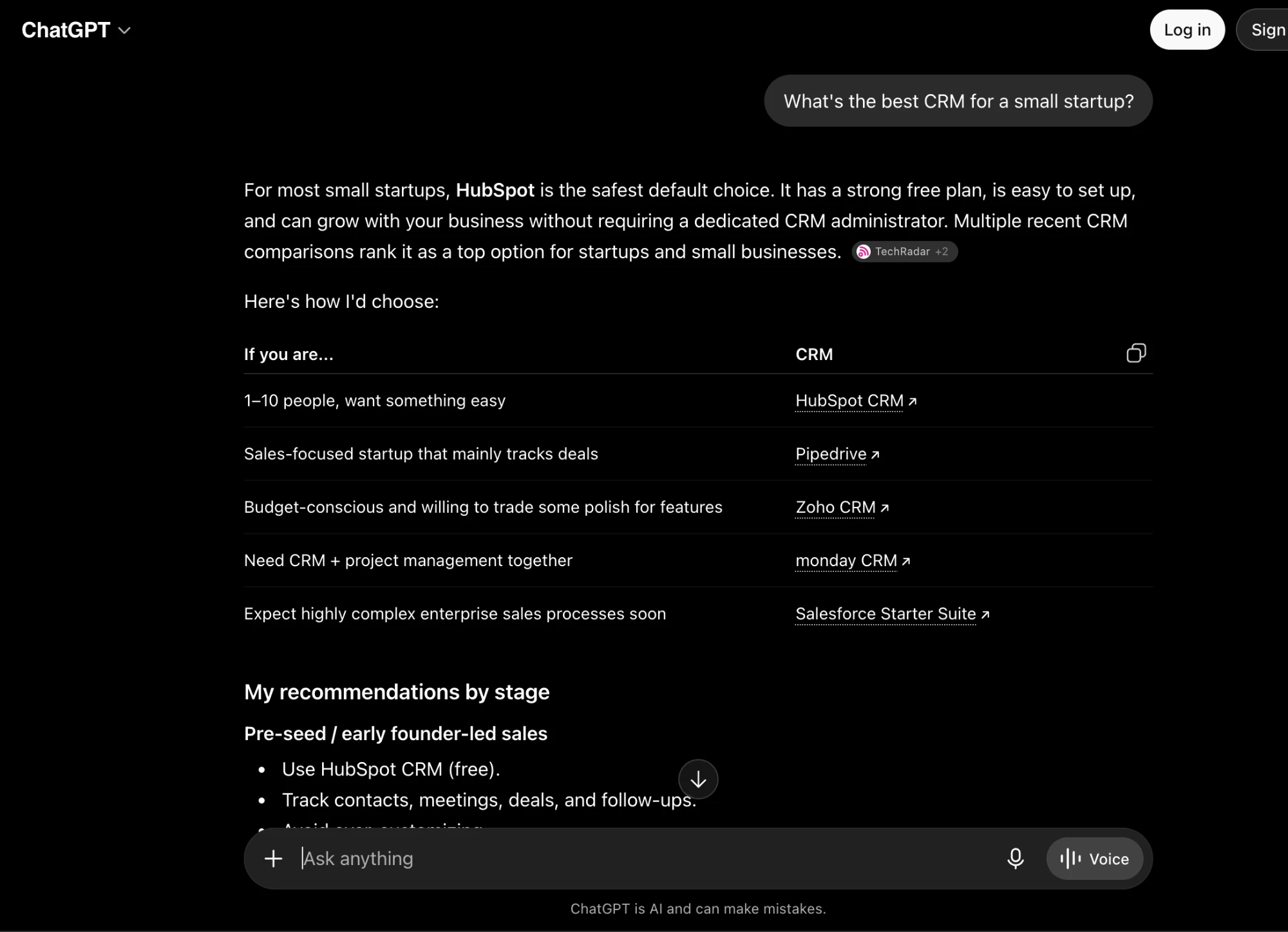
ChatGPT Search recommending CRMs for the same prompt, with source links you can click to verify.
3. Google AI Mode / AI Overviews — best for reach and quick everyday answers
Best for: fast answers for the largest possible audience.
This is the engine most of the world actually uses, because it's built right into Google. AI Mode is now the default search experience, powered by Gemini, and you can slide from a quick AI Overview at the top of the results into a full back-and-forth conversation. That reach is the whole story here. People don't have to install anything or change a habit — they type a query like they always have, and an AI answer is just there. Behind the scenes Google fans your question out into several related searches, pulls passages from the pages it trusts, and stitches them into one summary. For brands it's the highest-stakes surface of all, simply because of the sheer volume flowing through it.
The catch is how it treats sources. Citations sit in a right-hand panel or as small links tucked beside the answer, not front and center, and the zero-click design means users rarely click through to the cited page — they read the summary and move on. So you can be the source Google leaned on and still see almost no traffic from it. Visibility here is also volatile: the Gemini 3 rollout reshuffled cited domains heavily, and a page that anchored an answer one week can quietly vanish the next. If you're going to chase one engine, this is the one that matters most and the one you can control least.
What it's great at:
- Reach no other engine comes close to — it's the default for ordinary Google searches
- Zero friction: users get AI answers without installing or switching anything
- Handles everything from quick factual lookups to deeper, conversational follow-ups
- Deeply tied into Google's index, so it pulls from an enormous pool of pages
- Rewards genuinely authoritative, well-structured content that answers the query directly
Where it falls short:
- Zero-click by design — being cited rarely turns into an actual site visit
- Citations are buried in a side panel, so they're easy for users to ignore
- Highly volatile: model rollouts like Gemini 3 can reshuffle who gets cited overnight
- Little transparency into why one page is chosen over another, making it hard to optimize
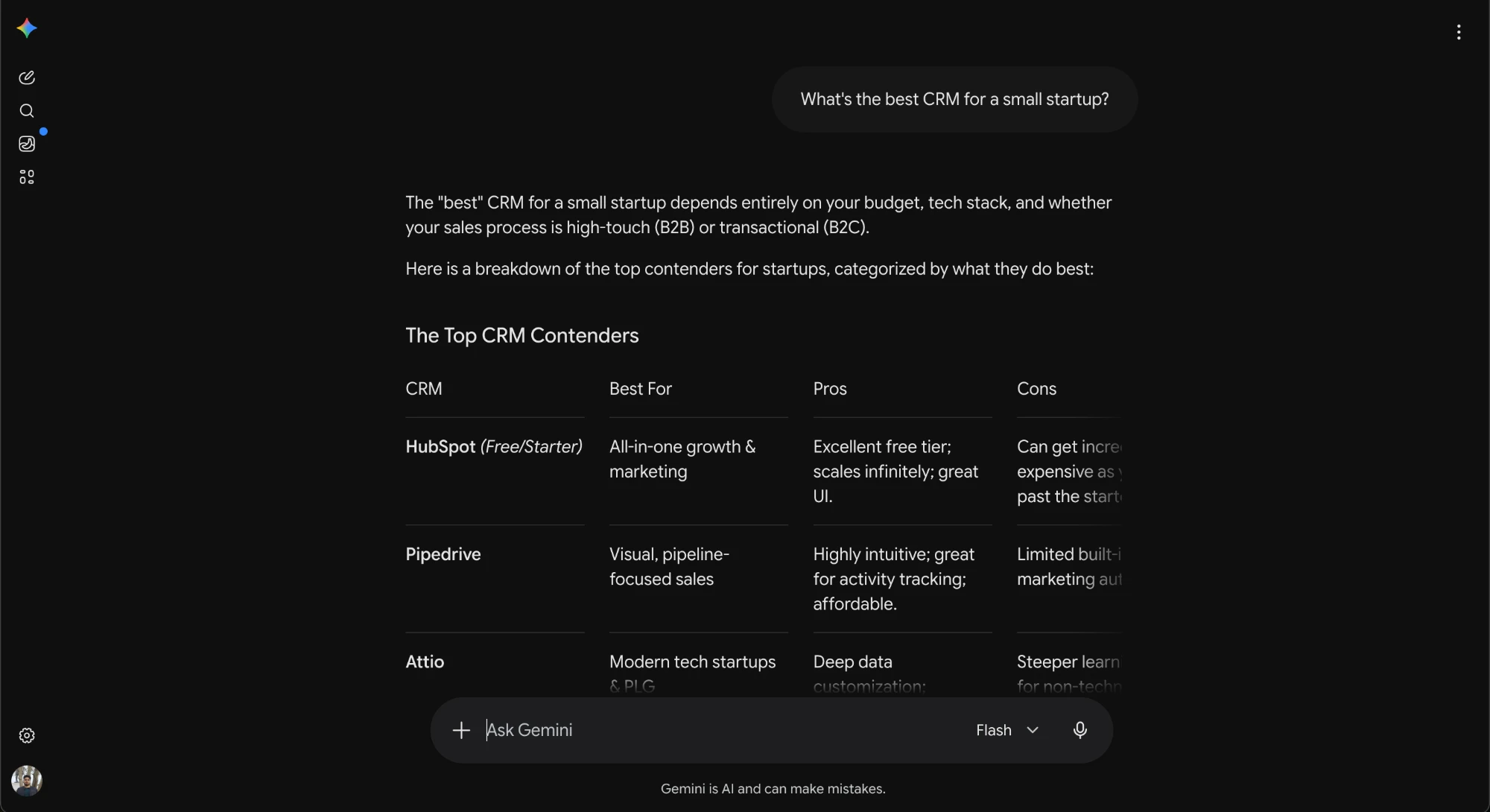
Gemini's take on the same question — Google's AI now answers directly, where ten blue links used to be.
4. Microsoft Copilot — best source-attribution experience
Best for: Microsoft-ecosystem users who want clear, clickable sources.
Microsoft Copilot runs on GPT-5 and is free for everyone, which alone makes it one of the easiest ways to reach a frontier model without paying a cent. What impressed me most, though, is the citation UI — quietly one of the best anywhere. Every answer gets clickable source cards underneath it, and a "Show all" provenance pane opens the full list so you can see exactly where each claim came from. For anyone tracking AI visibility, that transparency is gold: you can tell at a glance whether your page got cited or skipped.
The other thing Copilot has going for it is distribution. It's woven into Windows, Edge, and Office, so it meets people where they already work instead of asking them to open a new tab. It can even blend GPT and Claude models to cross-check itself, which tends to catch more mistakes than any single model does. My one real gripe is plan confusion: consumer Copilot Pro and Microsoft 365 Copilot are two different products with different features and audiences, and Microsoft does a poor job of explaining which one you actually need.
What it's great at:
- Free access to a frontier model (GPT-5) for everyone — no paywall to get started
- Genuinely excellent source transparency: clickable citation cards plus a full "Show all" provenance pane
- Deep integration into Windows, Edge, and Office, so it's already where you work
- Can blend GPT and Claude models to cross-check its own answers
- Strong default if you already live in the Microsoft ecosystem
Where it falls short:
- Confusing lineup — consumer Copilot Pro and Microsoft 365 Copilot are easy to mix up
- The Microsoft 365 tier is relatively pricey and aimed at organizations, not individuals
- The best experience is tied to Microsoft's own apps and browser
- Features still roll out unevenly across regions and plans
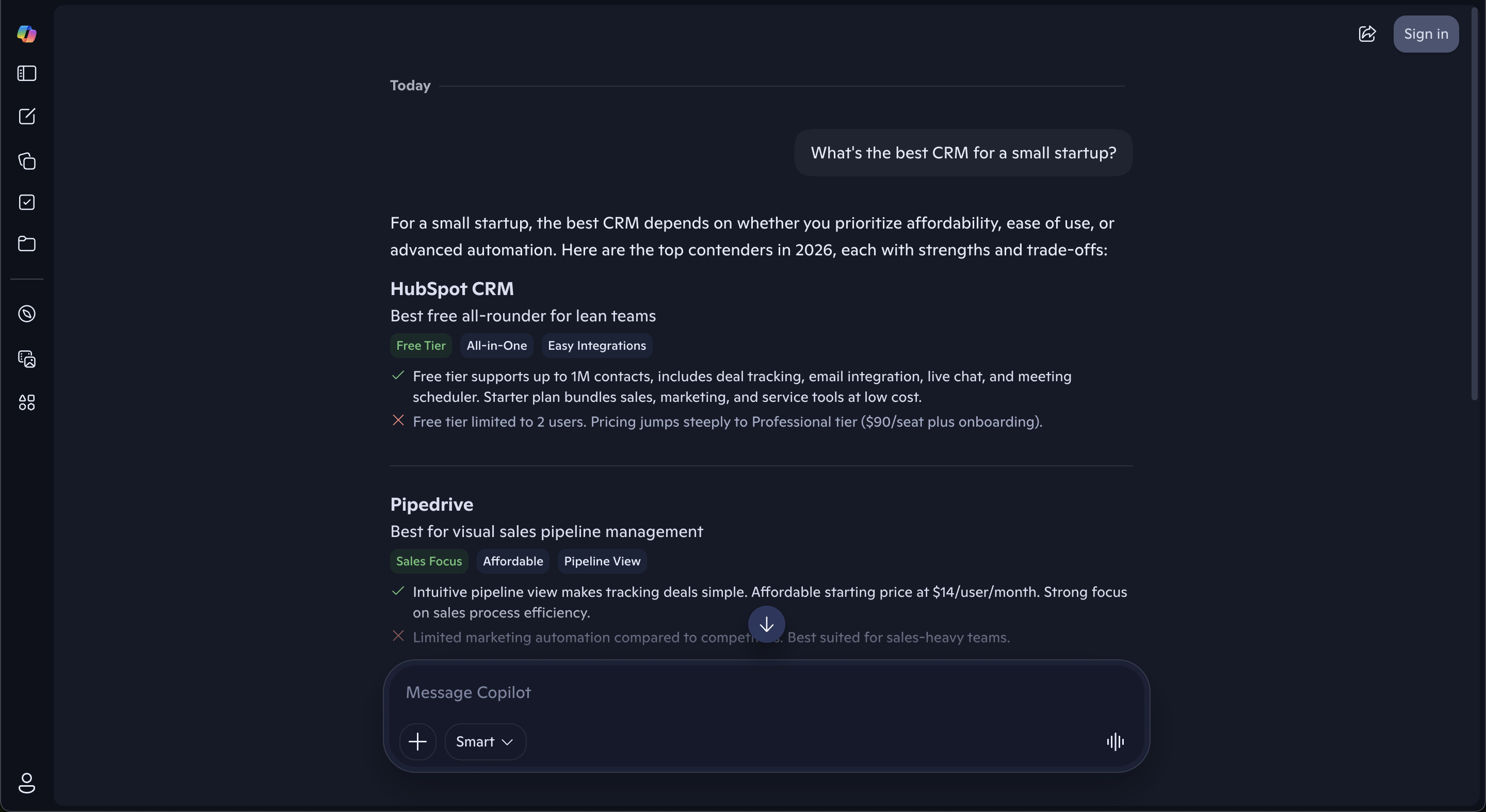
Microsoft Copilot's answer — a clean pros/cons breakdown per tool, with clickable source cards and a "Show all" sources pane on the full view.
5. Claude (Anthropic) — best for careful reasoning and long documents
Best for: thoughtful analysis, long-document work, and developers who need grounded answers.
Claude, from Anthropic, is the most cautious of the major assistants. It tends to verify before it cites, and when you turn web search on it shows clean inline source links you can click through and check. What sets it apart for me is the huge 1M-token context window on Opus 4.8 and Sonnet 4.6 — you can drop a whole book, a quarter of earnings reports, or an entire codebase into one conversation and it holds the thread. That makes it superb for digesting long documents and reasoning across a big pile of material in a single pass.
The trade-off is how it treats the open web. Claude doesn't browse by default, so unless web search is enabled you get a thoughtful, well-reasoned answer with no sources behind it — it's leaning on training data, not the live internet. Flip search on and that changes: it goes and finds pages, then attributes them. So the mental model is simple. Claude is a reader and a reasoner first, a searcher second. If you're a researcher, analyst, writer, or developer who wants careful answers over material you supply, it's a strong fit. If you want a live-web answer engine, remember to switch search on.
What it's great at:
- Careful, verify-before-it-cites answers that don't overreach
- Clean inline source links when web search is turned on
- A 1M-token context window on Opus 4.8 and Sonnet 4.6 for long inputs
- Digesting long reports, contracts, and full codebases in one go
- Nuanced reasoning and writing over material you paste in
- Following complex, multi-step instructions without losing the thread
Where it falls short:
- Doesn't browse by default — no sources unless you enable web search
- Out of the box it answers from training data, so freshness can lag
- Search is a setting to remember, not the default behavior
- Relatively pricey at the top tier compared with lighter options
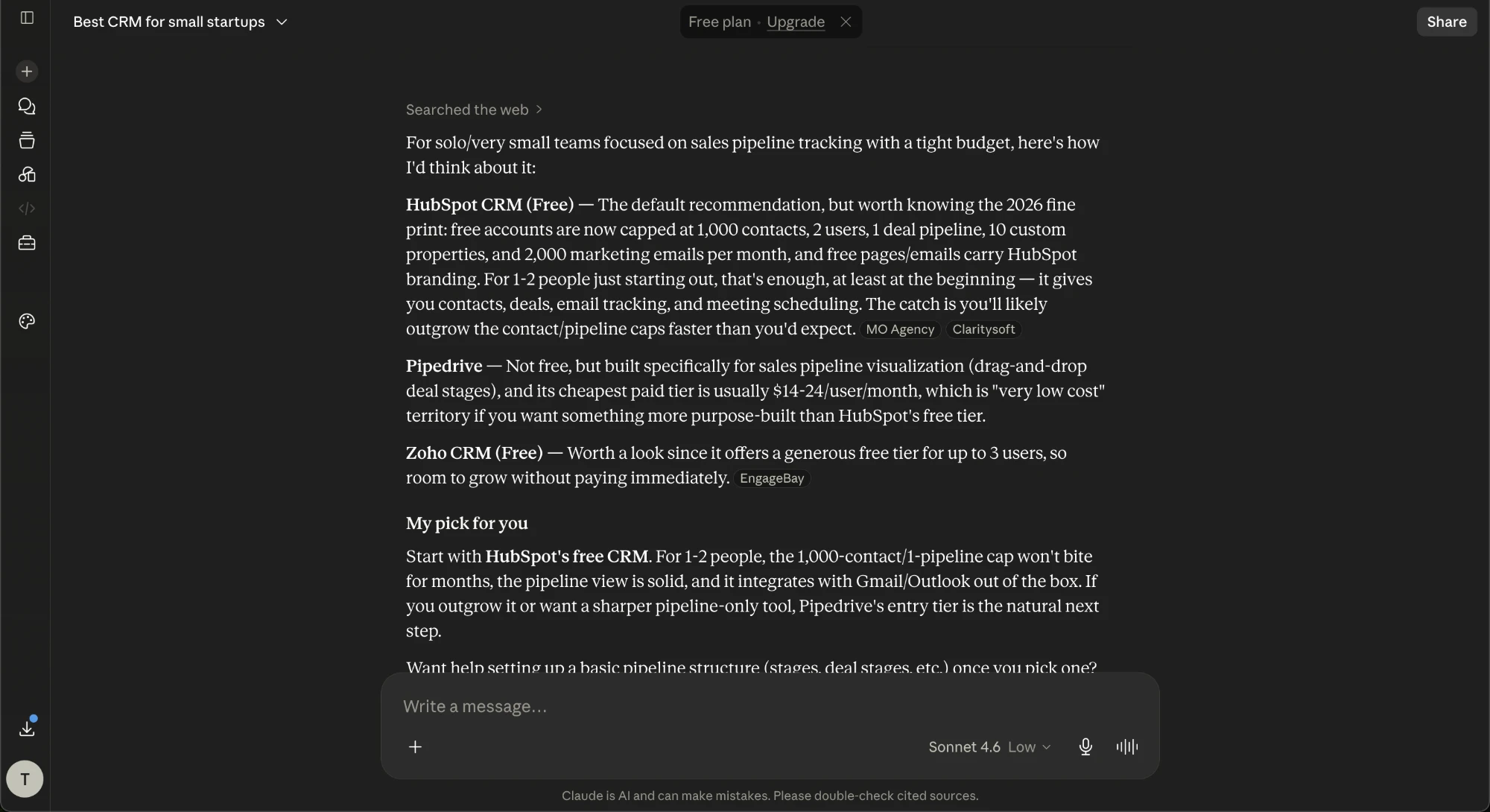
Claude with web search on — note its "double-check cited sources" reminder. It's the most cautious of the bunch.
6. Grok (xAI) — best for real-time and what's-happening-on-X
Best for: live, of-the-moment research that blends the open web with X/Twitter.
Grok is xAI's engine, and it lives inside X — which is exactly where its edge comes from. It can search X posts in real time alongside the open web, and that firehose is something no other major engine has. So it genuinely shines on breaking news and social sentiment: what people are saying about a topic right now, not what a page said six months ago. Its DeepSearch mode goes further, running multi-step searches to produce long, structured reports. The tone is looser and less filtered than most rivals, which some people love and others find distracting.
On sources, though, I'd stay cautious. Independent testing by the Columbia Journalism Review found Grok had the worst citation-hallucination rate of the major engines — the sources it cited often didn't actually support the claim being made. So Grok is great for real-time signal and catching a story as it breaks, but weaker when you need to be exactly right. I treat its links as leads to verify, not proof. If accuracy matters more than speed, check every citation before you trust it.
What it's great at:
- Real-time access to X posts alongside the web — a firehose no other major engine has
- Breaking news and live events, where freshness beats polish
- Reading social sentiment: what people are actually saying about a topic right now
- DeepSearch mode for long, structured research reports
- A looser, more conversational tone that answers questions other engines dodge
Where it falls short:
- Worst citation-hallucination rate of the major engines in CJR's testing — cited sources often don't back the claim
- You have to verify its links yourself; treat them as leads, not proof
- Leans heavily on X, so it inherits that platform's noise and bias
- Overkill when you just want a quick, reliable factual answer
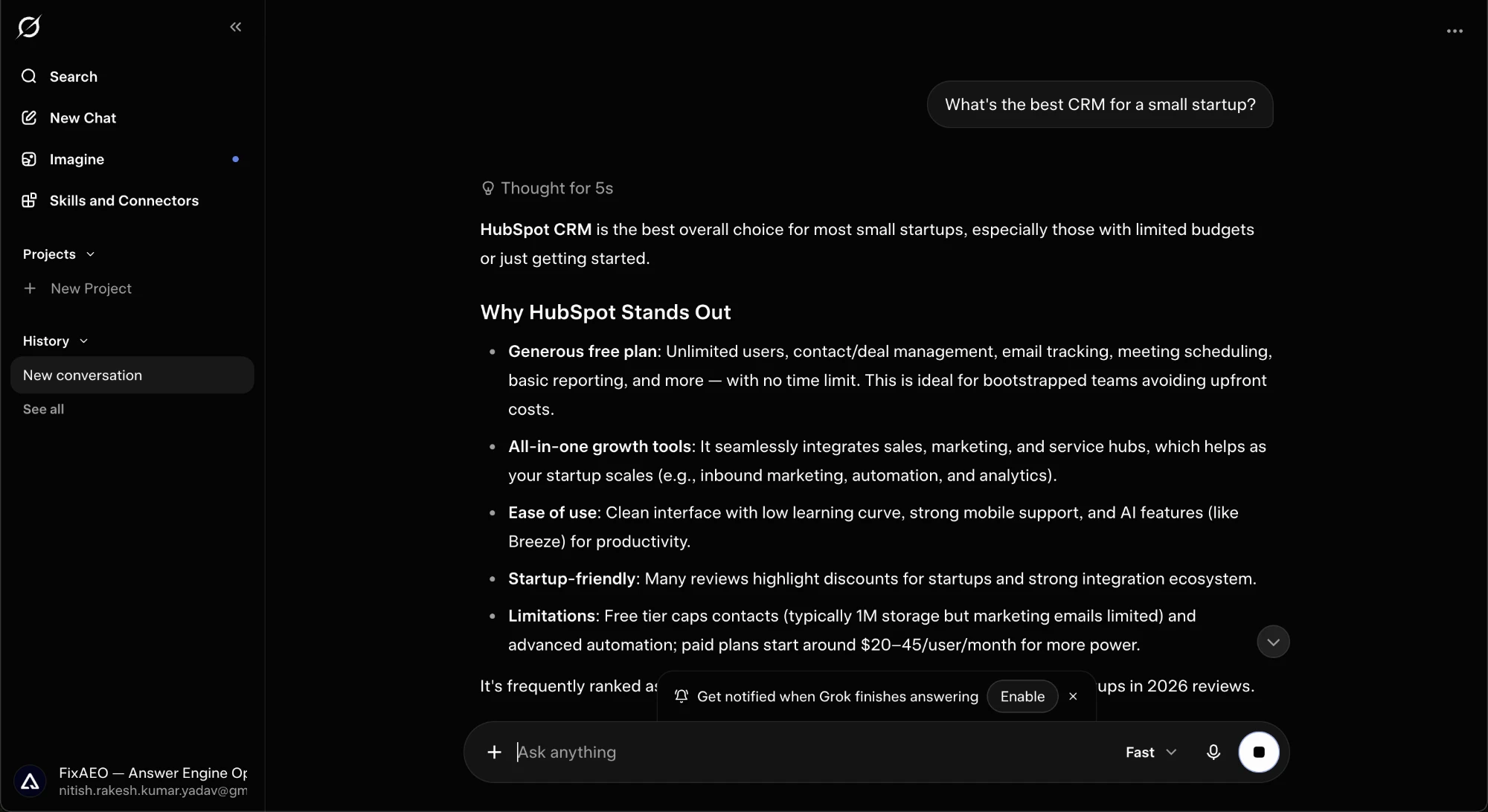
Grok's answer — fast and confident, but always verify: its citation accuracy lags the other engines here.
7. Meta AI — best for casual answers where you already are
Best for: quick, conversational help inside WhatsApp, Instagram, and Messenger.
With 600M+ monthly users, Meta AI may be the most-used assistant on earth, and the reason is distribution, not raw smarts. It lives inside WhatsApp, Instagram, Messenger, and Facebook — apps you already open all day — plus a standalone app and the meta.ai site. There's no separate signup and no cost, so most people end up using it by accident: they tap the assistant in a chat they were already in. Under the hood it runs on Meta's own Llama models, and it handles text, image, and voice in one place. For how that reach stacks up against ChatGPT and the rest, see who actually uses these engines.
In practice it feels built for quick, casual moments rather than deep work. You can ask it something mid-conversation, have it generate or tweak an image from a prompt, or talk to it by voice. On factual questions it adds light source links — typically 2 to 4 — so you get some grounding, but it's tuned for casual chat, not rigorous research. I wouldn't lean on it for anything where I need well-sourced, defensible answers. Availability is also still rolling out, so the exact features and languages you get depend on your country.
What it's great at:
- Already inside WhatsApp, Instagram, Messenger, and Facebook — zero setup, no extra login
- Fast casual Q&A and brainstorming without leaving the chat you're in
- Generating and editing images straight from a text prompt
- Voice conversations alongside text
- Handy in group chats — tag it to settle a quick question mid-thread
- Free to use
Where it falls short:
- Thin sourcing (2–4 links) — not built for well-cited or research-grade work
- Tuned for casual chat, so it goes shallow on complex or technical topics
- Availability and features are still rolling out, so what you get varies by region and language
- Keeps you inside Meta's ecosystem, with the privacy tradeoffs that come with it
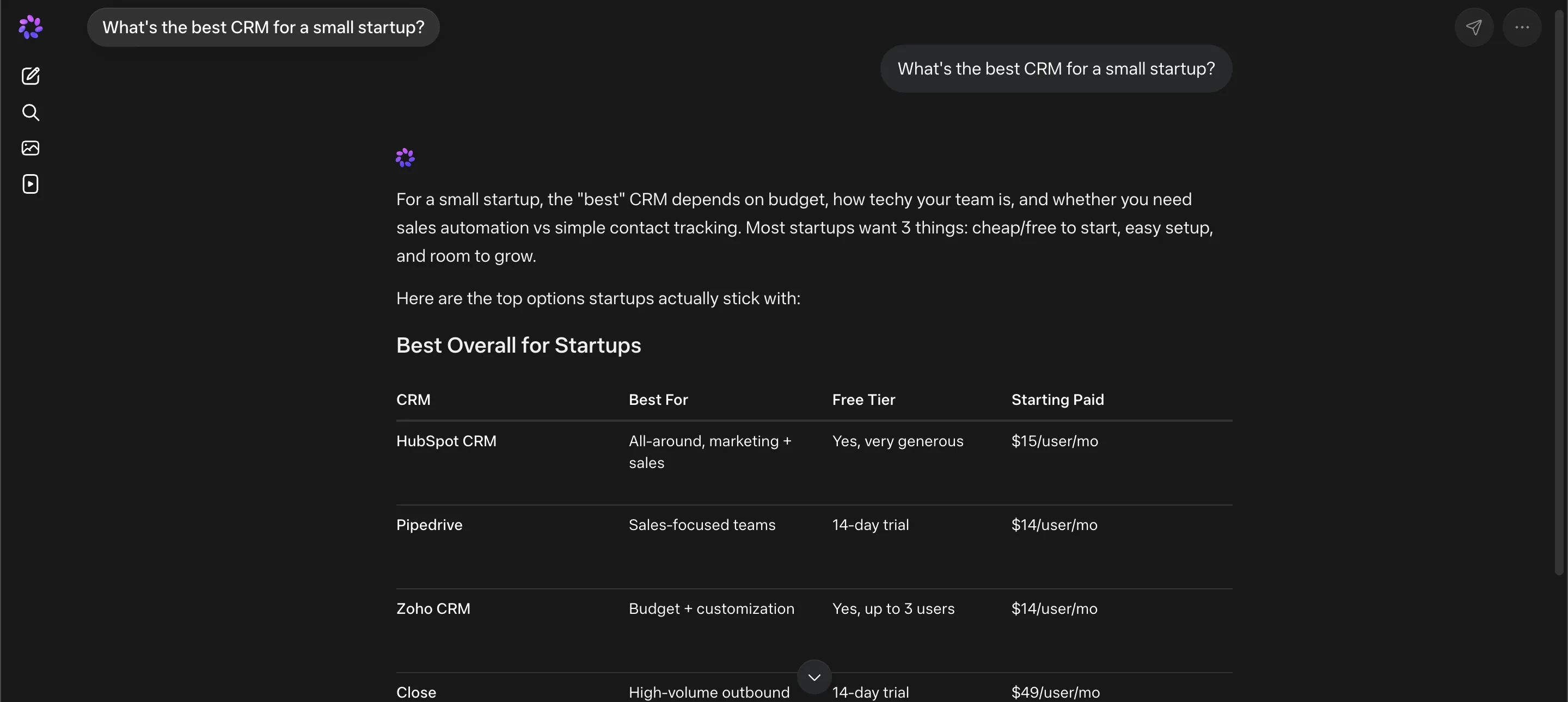
Meta AI on the same test question — a quick startup-CRM table right inside the chat.
8. DeepSeek — best cheap / open-weight option
Best for: cost-sensitive users and developers who want strong reasoning on a budget.
DeepSeek is the outlier here, and I mean that as a compliment. It delivers genuinely strong reasoning at a fraction of US frontier prices, and the chat app is free with effectively unlimited use — I've never hit a wall in normal work. What matters most to builders is that DeepSeek ships an open-weight model you can download and self-host, so with the right hardware you run it on your own infrastructure with no per-token bill at all. Cheap API, free chat, self-hostable weights — that combination is why it spread so fast among developers and cost-conscious teams.
On search, flipping on web-search mode is where it earns its keep. It shows its reasoning steps as it works and lays out the citations it pulled from, so you can see how it reached an answer instead of trusting a black box — more transparent than most chatbots that just hand you a result. Two caveats keep it off the top of my list for most businesses. First, data is processed in China, which is a hard compliance blocker for many companies regardless of model quality; legal and security teams tend to say no before the conversation even starts. Second, its citation quality on news sources can be inconsistent, so I wouldn't lean on it for breaking or fast-moving stories.
What it's great at:
- Reasoning-heavy work — math, code, logic — at a price that undercuts the US frontier labs
- Free, effectively unlimited chat, with no message caps to plan around
- The only model here you can truly self-host: grab the open weights and run it on your own hardware
- Transparent web search that exposes its reasoning steps and the sources it cited
- Budget-conscious teams and developers who want near-frontier quality without frontier bills
Where it falls short:
- Data is processed in China — a non-starter for many companies' legal and security teams
- Citation quality on news and fast-moving topics can be shaky
- Self-hosting the open weights takes real GPU hardware and setup, not a click-and-go option
- A less polished app and integration ecosystem than the big US players
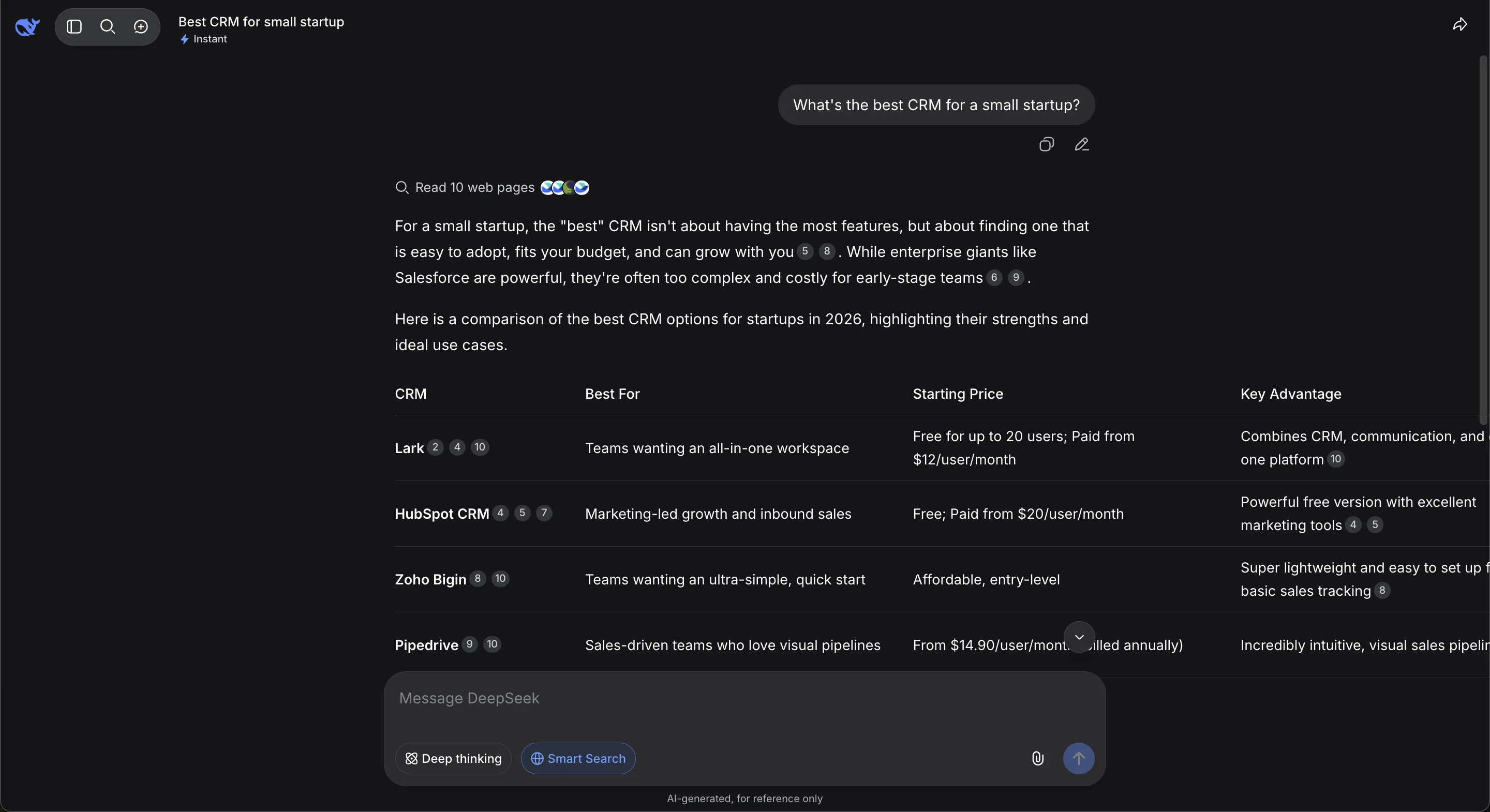
DeepSeek with Smart Search on — note the "Read 10 web pages" line and the inline citation numbers behind each pick.
9. Brave Search (+ Leo) — best independent, privacy-first answer engine
Best for: privacy-conscious users who want cited AI answers from an independent index.
Brave is the answer engine for people who care about independence and privacy. Its "Answer with AI" summarizes results with sources shown right there, and every one of those sources comes from Brave's own index — not Google's, not Bing's. That matters more than it sounds. Most "alternative" search tools quietly resell Bing results; Brave actually crawls the web itself, so its answers reflect a genuinely different view of what's out there. And it works with no login at all, which is rare — you just search and read.
The other half is Leo, the assistant baked into the Brave browser. It runs alongside your tabs, can read the page you're currently on to summarize or answer questions about it, and — the part I like most — it lets you bring your own local model, so your prompts never have to leave your machine. That's a real privacy story, not a marketing one. The tradeoff is coverage: an independent index is impressive, but it's thinner on long-tail and obscure queries than the giants, so niche searches sometimes come up short. And when I tested it, full per-claim source links inside Leo's chat were still rolling out — the web results cite well, but the assistant's own answers weren't yet as traceable.
What it's great at:
- Genuinely independent index — answers aren't reheated Google or Bing results
- Zero-login, private search you can use immediately
- Leo assistant lives in the browser and can read your current page
- Bring-your-own local model support keeps prompts fully on-device
- Clear source attribution on the web-answer side
Where it falls short:
- Independent index gets thin on long-tail and niche queries
- Per-claim source links inside Leo's chat were still rolling out at testing
- Best experience is tied to using the Brave browser
- Answer quality trails the largest engines on hard, obscure questions
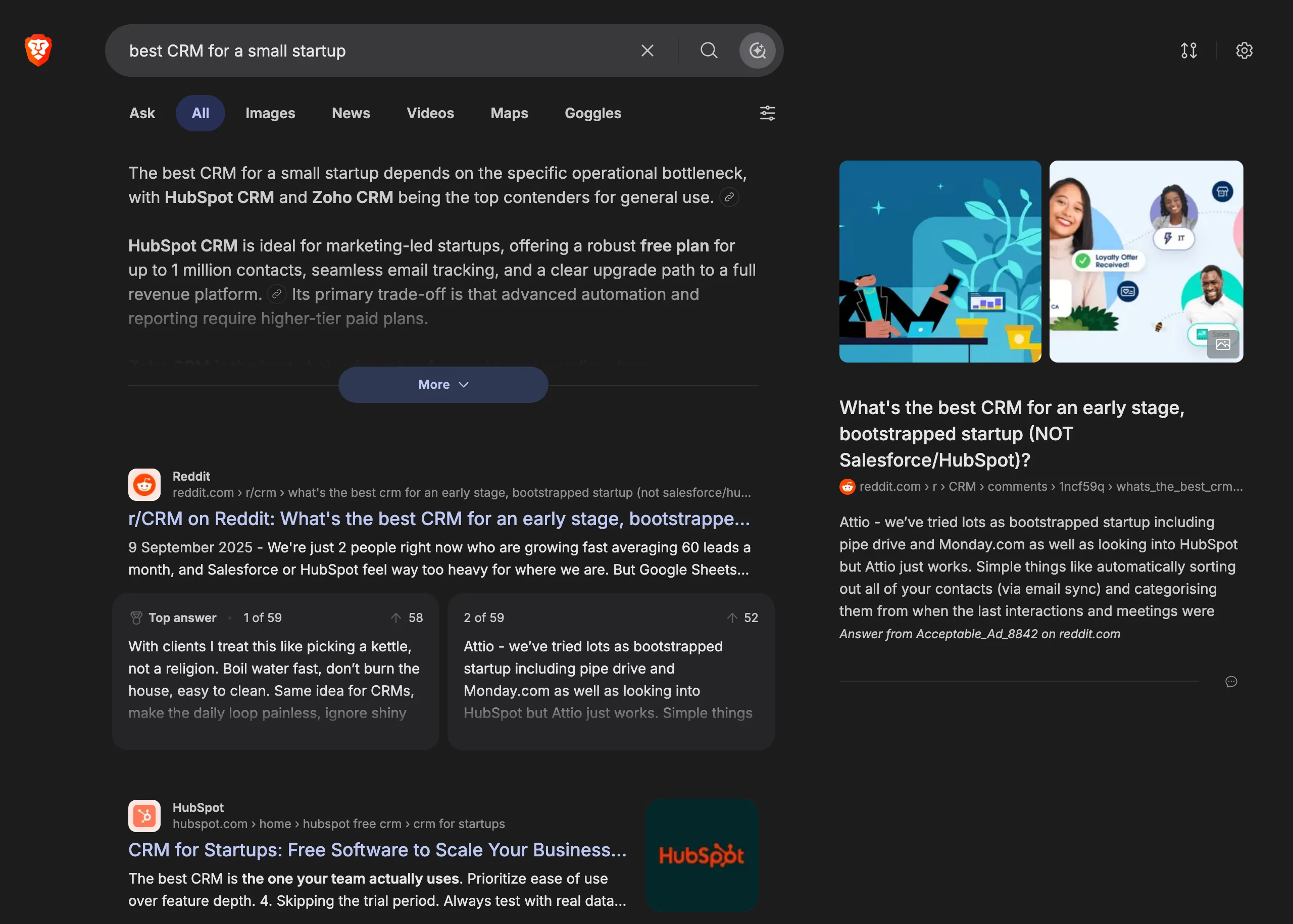
Brave answering the same test question — an AI summary with sources, drawn from Brave's own independent index.
10. DuckDuckGo Duck.ai — best for maximum privacy
Best for: anonymous access to multiple frontier models with zero tracking.
Duck.ai is DuckDuckGo's take on an AI chat box, and it fits their whole brand: privacy first. It proxies your prompts to models from Anthropic, OpenAI, Mistral, and Meta, so the model on the other end never sees your IP address, and nothing you type is used for training. You can use it without a DuckDuckGo account, pick which model answers, and clear the whole conversation with one button. If you want to ask a general question and not have it logged against your identity, this is one of the cleanest options I tested.
But I have to be honest about why it sits awkwardly on a list like this: it's a chat wrapper, not a search engine. It doesn't browse the live web, and it answers purely from the model's built-in training knowledge. That means no sources, no links, and no citations under the answer — and no way for a brand to earn a mention, because there's no retrieval step reaching out to real pages. For an AEO strategy, Duck.ai is effectively a dead end. I'm including it because people genuinely use it and confuse it with AI search, not because you can optimize for it.
What it's great at:
- Strong privacy — prompts are proxied so the model never sees your IP
- Nothing you enter is used to train the underlying models
- Choice of models from Anthropic, OpenAI, Mistral, and Meta in one place
- Usable with no account and easy to wipe your chat history
- A low-friction way to try several frontier models side by side
Where it falls short:
- It's a chat wrapper, not a search engine — no live web browsing
- Shows no citations or source links at all
- Brands cannot be cited or surfaced here, so there's nothing to optimize
- Answers are limited to the model's training data and can be stale
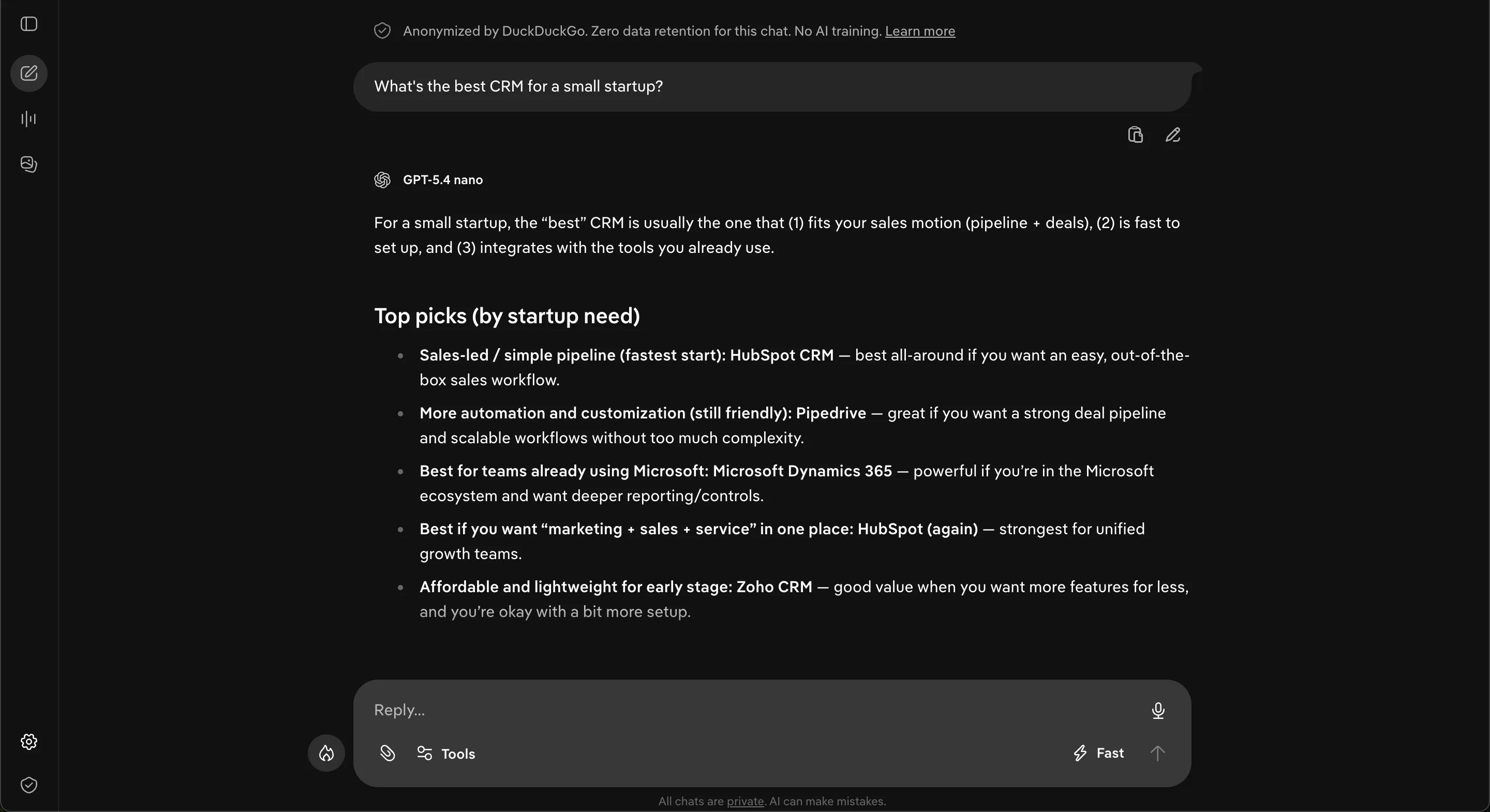
Duck.ai's answer — anonymized, no citations, just the model's picks (here via GPT-5.4 nano).
11. You.com — best multi-model research engine
Best for: professionals and developers who want many models plus a deep-research agent.
You.com started as a search engine you could tweak, and it has grown into a model-routing layer over the big LLMs. Ask it something and it can route across GPT, Claude, Gemini, and Llama, then hand back an answer with numbered, verifiable citations. I like that the sources are inline and checkable — you are not left guessing where a claim came from. The headline feature is ARI, its research agent, which can pull 400+ sources into a single cited report, charts and all, in minutes. When I need a fast literature sweep on a topic I do not know well, that breadth is genuinely useful.
The other half of You.com is developer-facing. It ships solid search and news APIs, so teams can plug that same web-grounded retrieval into their own apps and agents. That is where the company clearly puts its energy now — it leans enterprise, and the consumer chat experience gets less attention as a result. The free tier exists, but the quotas run out fast, so it reads more like a trial than a place to live day to day.
What it's great at:
- Deep research runs — ARI turns 400+ sources into one cited report with charts in minutes
- Multi-model routing across GPT, Claude, Gemini, and Llama without you switching tools
- Numbered, verifiable citations you can actually click and check
- Developer search and news APIs for building web-grounded apps and agents
- Broad source coverage when you are surveying a topic you do not know well
Where it falls short:
- Free-tier quotas run out fast, so real use pushes you to pay
- The consumer experience gets less love now that the focus is enterprise
- The multi-model, agent-plus-API setup is more than a casual searcher needs
- Less mindshare than the household-name assistants, so fewer people think to try it
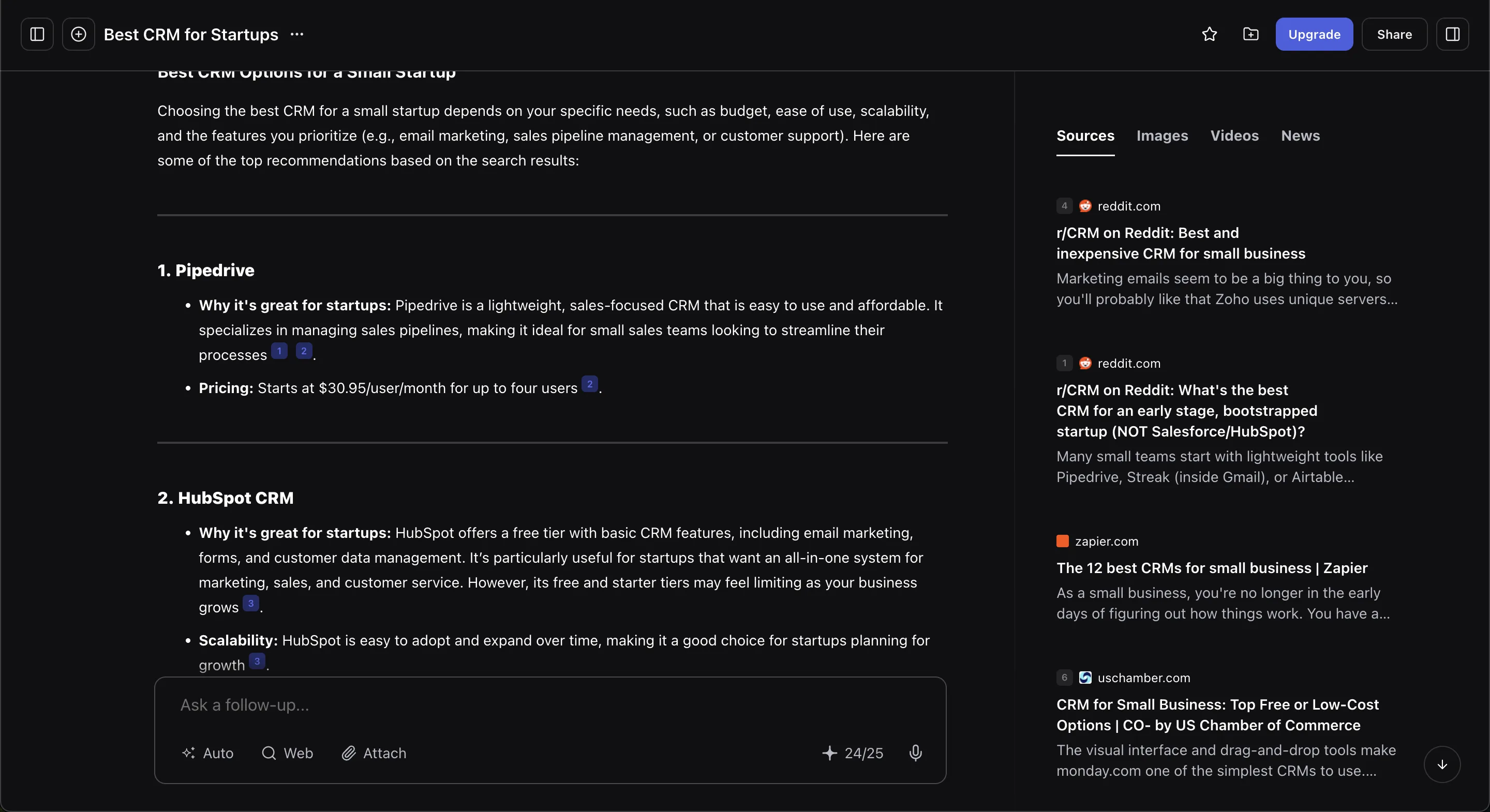
You.com's answer with numbered citations and a live Sources panel (Reddit, Zapier, and more).
12. Kagi — best paid, ad-free engine for power users
Best for: people who'll pay to never see an ad or be tracked — and still want trustworthy citations.
Kagi is the one search engine I pay for, and that's the whole point of it. There's no free tier and no ads — you subscribe (roughly $5–25/mo depending on the plan) and in exchange you get a clean results page with no sponsored slots and no tracking-driven ranking. Because the business model is subscriptions instead of ads, the incentives line up with the searcher rather than the advertiser, and you get controls the big engines don't offer: you can pin, boost, or fully block domains so your results actually reflect the sites you trust. It runs on its own index blended with other sources, which keeps it independent but also keeps it smaller than Google or Bing.
The AI side is built the same way. The Assistant bundles 30+ switchable models — you pick which one answers, from various frontier and open models — and it grounds answers in live search with hyperlinked inline citations that reviewers consistently praise for accuracy. For developers there's FastGPT, an API that returns fast, cited answers you can wire into your own tools. If your work depends on knowing where a claim came from, Kagi treats sources as a first-class feature, not an afterthought.
What it's great at:
- Ad-free, tracking-free search where ranking isn't sold to the highest bidder
- Per-user domain controls — pin, raise, lower, or block any site
- One Assistant that switches between 30+ models so you're not locked to a single vendor
- Inline citations that are genuinely accurate and easy to click through
- FastGPT API for developers who need quick, source-backed answers in their own apps
Where it falls short:
- You have to pay — no free tier to trial casually
- Relatively pricey next to free mainstream search
- Smaller index than Google or Bing, so obscure long-tail queries can come up thin
- Small audience and brand awareness compared with the giants
- The many-models, many-settings setup has a learning curve for casual users
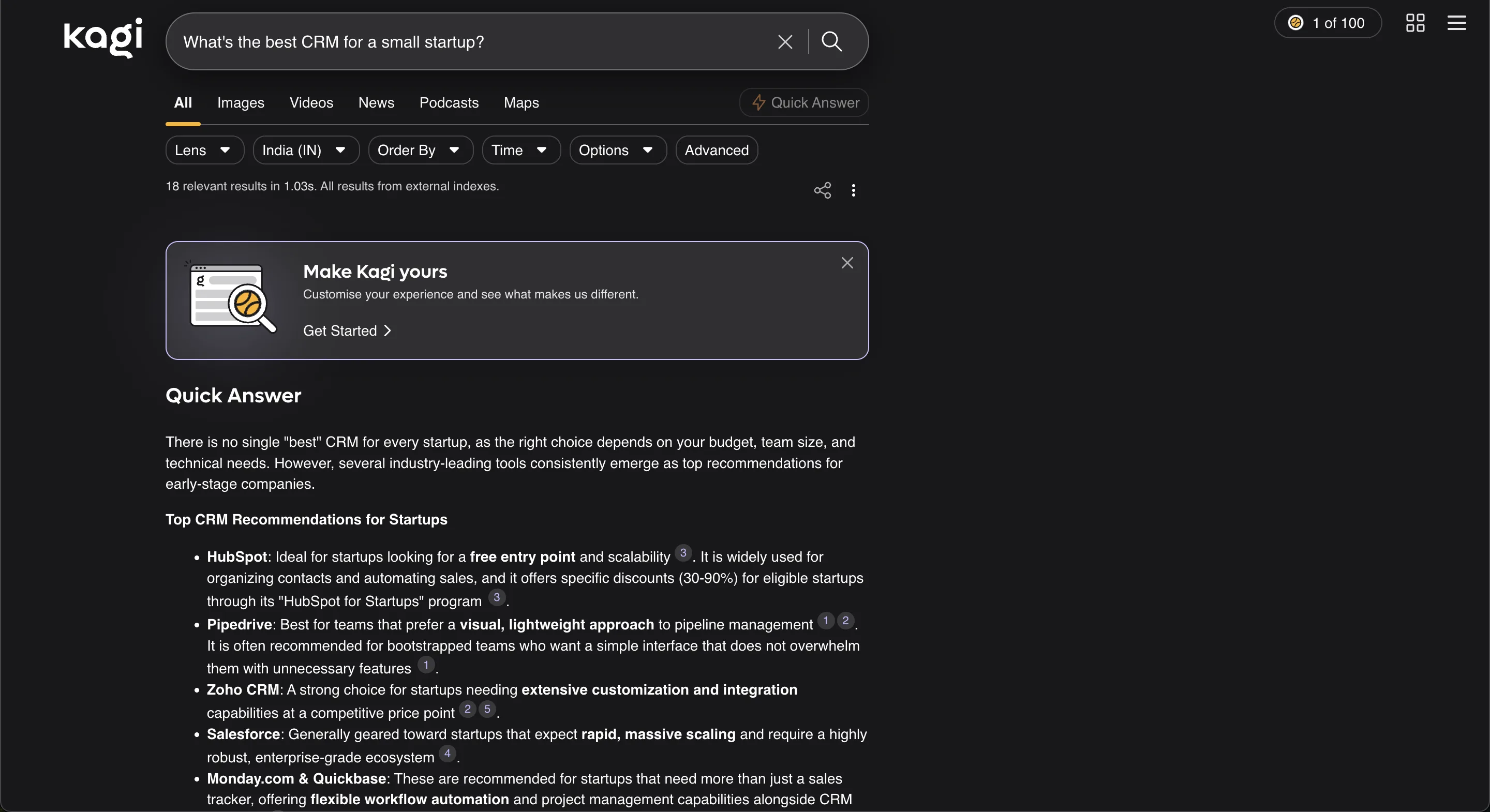
Kagi's Quick Answer — cited CRM recommendations sitting above its ad-free results.
13. Komo AI — best private, source-cited niche engine
Best for: privacy-minded research with selectable data sources.
Komo is a smaller, independent AI search engine built around a clean, distraction-free experience — no ads, no tracking. What I like most is how seriously it treats sources. Every answer carries prominent numbered citations, and each one gives you the source URL, the date, a short excerpt from the page, and authority signals so you can judge how much to trust it. If provenance matters to you — checking where a claim actually came from before you repeat it — that is a real differentiator most mainstream engines do not bother with.
The other useful lever is scoped search. You can point a query at Academic, News, Blog, Social, or Video instead of the whole open web, which makes it easy to steer toward peer-reviewed work or fresh reporting depending on what you are after. It is clearly smaller than the big names, so you will not get the polish, speed, or ecosystem of the household-name engines — and its pricing tiers vary across review sites, so I would confirm the current plans directly on komo.ai rather than trusting a third-party roundup.
What it's great at:
- Provenance: numbered citations with source URL, date, an excerpt, and authority signals on every answer
- A genuinely ad-free and tracking-free experience with no clutter
- Scoped search across Academic, News, Blog, Social, and Video
- Fact-checking and research where knowing exactly where a claim came from matters
- Steering a query toward peer-reviewed material or fresh reporting on demand
Where it falls short:
- Smaller than the major engines, so it lacks their polish, speed, and ecosystem
- Pricing is reported inconsistently across review sites — confirm the current plans on komo.ai
- Lower brand recognition and a thinner community than the big names
- Not the obvious pick for general-purpose, everyday conversational use
14. Arc Search — best mobile synthesized answers
Best for: a fast, single answer pulled from multiple pages, on your phone.
Arc Search isn't a chatbot you sit and converse with — it's a feature inside a browser. You type a question, tap "Browse for Me," and Arc quietly opens several sites in the background, reads them, and stitches what it finds into one clean, cited answer page you can scroll on your phone. It's a genuinely lovely mobile experience, and it's completely free. I reach for it most when I'm out walking and want a fast, readable synthesis instead of a wall of blue links.
On sources, Arc leans on the open web and shows its work — the answer page links out to the pages it pulled from, so you can tap through and check anything that matters. The asterisk is about the future, not the product itself: The Browser Company has stopped active Arc development and is folding these ideas into its newer Dia browser. So I treat Arc as great-to-use-today but uncertain long-term — lovely right now, but I wouldn't build a workflow around it that I'd be sad to lose.
What it's great at:
- Fast mobile answers — the "Browse for Me" flow is designed for a phone screen, not a desktop
- Completely free, with no paywall or account gymnastics to get started
- Turns a messy search into one clean, readable summary instead of ten open tabs
- Links out to the pages it actually read, so verifying a claim is one tap away
- One of the nicest AI-answer designs I've used — it just feels pleasant
Where it falls short:
- Uncertain future: active development has stopped and the ideas are migrating into Dia
- Not built for deep research or long back-and-forth conversation — follow-ups stay shallow
- Very mobile-first; it doesn't really translate to heavy desktop work
- No analytics for brands or marketers — you can't tell whether it's citing you
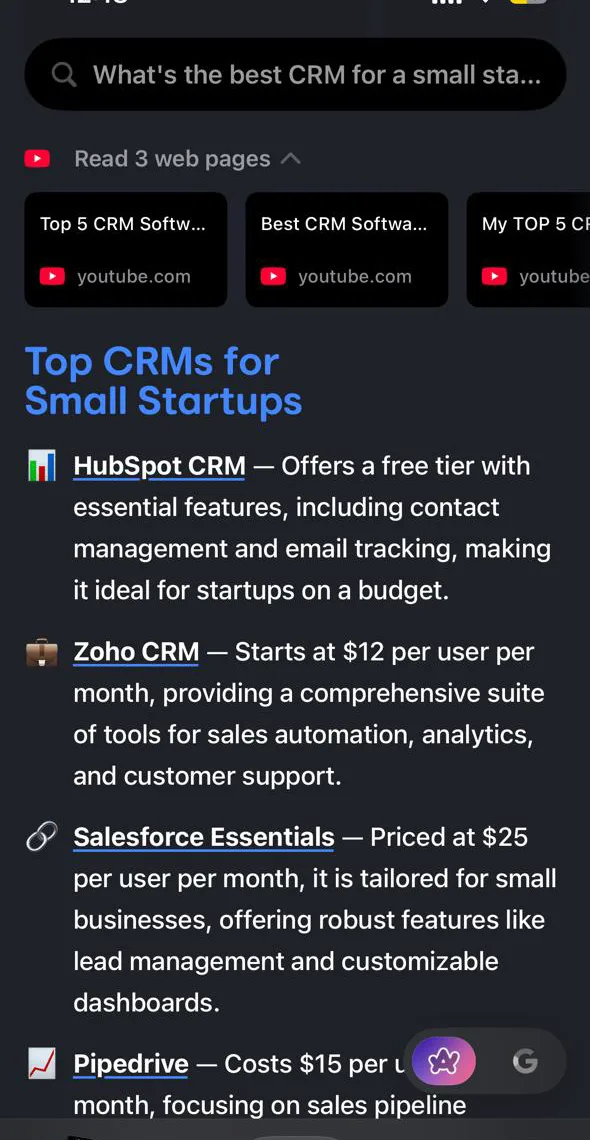
Arc Search's "Browse for Me" on mobile — several pages read into one clean, cited answer.
15. Wolfram Alpha — best for math, data, and computation
Best for: exact computational answers — math, science, unit conversions, statistics, dates.
Wolfram Alpha isn't an LLM web-search engine; it's a computational knowledge engine that calculates precise answers from curated data. You type a question in plain language, and instead of predicting text or crawling the web, it parses your input and runs a real computation against structured, vetted datasets — the same Wolfram Language technology that has powered Mathematica for decades. For anything quantitative — equations, unit conversions, "how far is Mars right now" — it's more reliable than any chatbot, because it's doing actual math rather than guessing at plausible-sounding words.
That design decides who it's for. Students, engineers, and scientists lean on it for step-by-step solutions, plots, and hard numbers they can trust. On sources it works the opposite way from a chatbot: rather than linking out to web pages, it computes from its own curated knowledge base and shows "source information" for the underlying data. It won't help with open-ended research or opinion, and it has no feel for nuance or current discourse. But for facts you can compute, nothing beats it — I keep it open as the fact-checker the LLMs can't be.
What it's great at:
- Exact math — algebra, calculus, and equations solved with steps you can actually follow
- Unit, currency, and date conversions, plus real-world quantities computed on demand
- Live scientific and astronomical data — planetary positions, physical constants, chemistry
- Deterministic answers: the same query returns the same correct result, with no hallucination
- Plots, tables, and formula derivations rendered right on the results page
Where it falls short:
- Useless for open-ended research, writing, or anything subjective
- No conversational memory or follow-up reasoning the way an LLM handles it
- Its natural-language parser can misread phrasing, so you sometimes rewrite the query
- Step-by-step solutions and deeper features sit behind a paid tier
- Coverage is only as good as its curated data — off-domain topics just come up empty
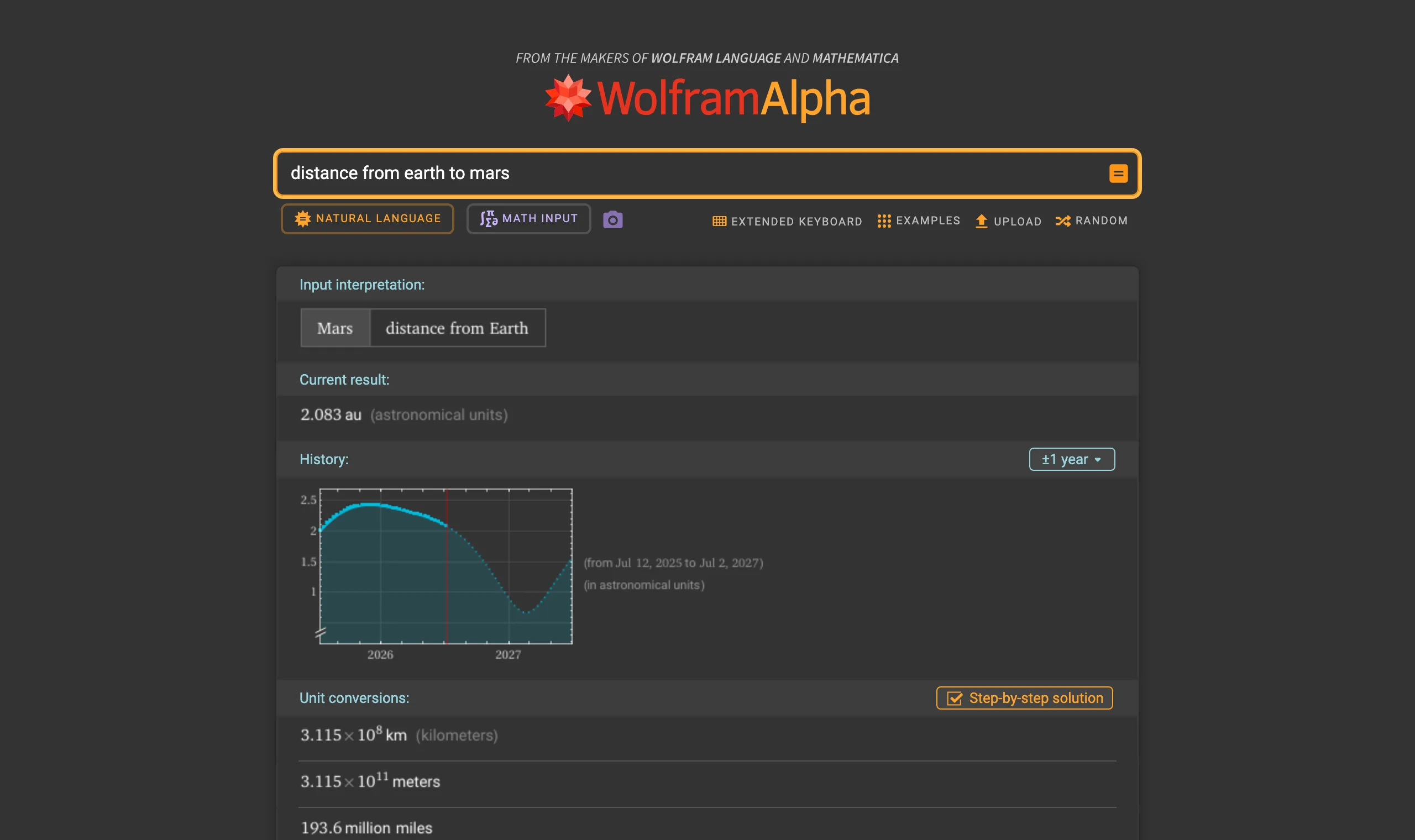
Wolfram Alpha doesn't chat — it computes. Here it returns the current Earth-to-Mars distance with unit conversions, the kind of exact answer no chatbot reliably nails.
Honorable mention (RIP): Phind
If you searched for this list a few months ago, you'd have seen Phind, a beloved developer-focused answer engine. It shut down on January 16, 2026 — and its story is the cautionary tale of this whole category. Once ChatGPT, Claude, and Google bolted web search onto their own products, a standalone niche search tool couldn't defend its turf. Worth remembering when you choose a default: bet on the engines with a real moat.
How to choose the right AI search engine for you
There's no single winner — it depends on what you're doing:
- Daily research and fact-finding with sources → start with Perplexity. It's the cleanest "answer + citations" experience.
- You already live in ChatGPT / Google / your browser → just turn on the AI search built into the tool you already use. The best AI search engine is often the one with zero extra friction.
- Deep, careful analysis of long documents → Claude.
- Coding and technical questions → Phind or ChatGPT.
- Privacy matters most → DuckDuckGo (Duck.ai), Brave, or Kagi.
- Real-time, what's-happening-now questions → Grok (tied into X) or Perplexity.
A practical tip: pick one as your default and learn it well, rather than bouncing between five. The compounding value is in building the habit of asking instead of keyword-searching.
The real question: do these engines recommend your business?
Here's the thing every "best AI search engine" list ignores. If you run a company, the most important question isn't which engine you use — it's whether these engines mention your brand when a potential customer asks.
When someone asks Perplexity "what's the best standing desk under $400," it names a handful of brands. If you sell standing desks and you're not one of them, you're invisible at the exact moment a buying decision is made — and unlike Google, there's no page 2 to scroll to. This is the new SEO, and it has a name: AEO (Answer Engine Optimization).
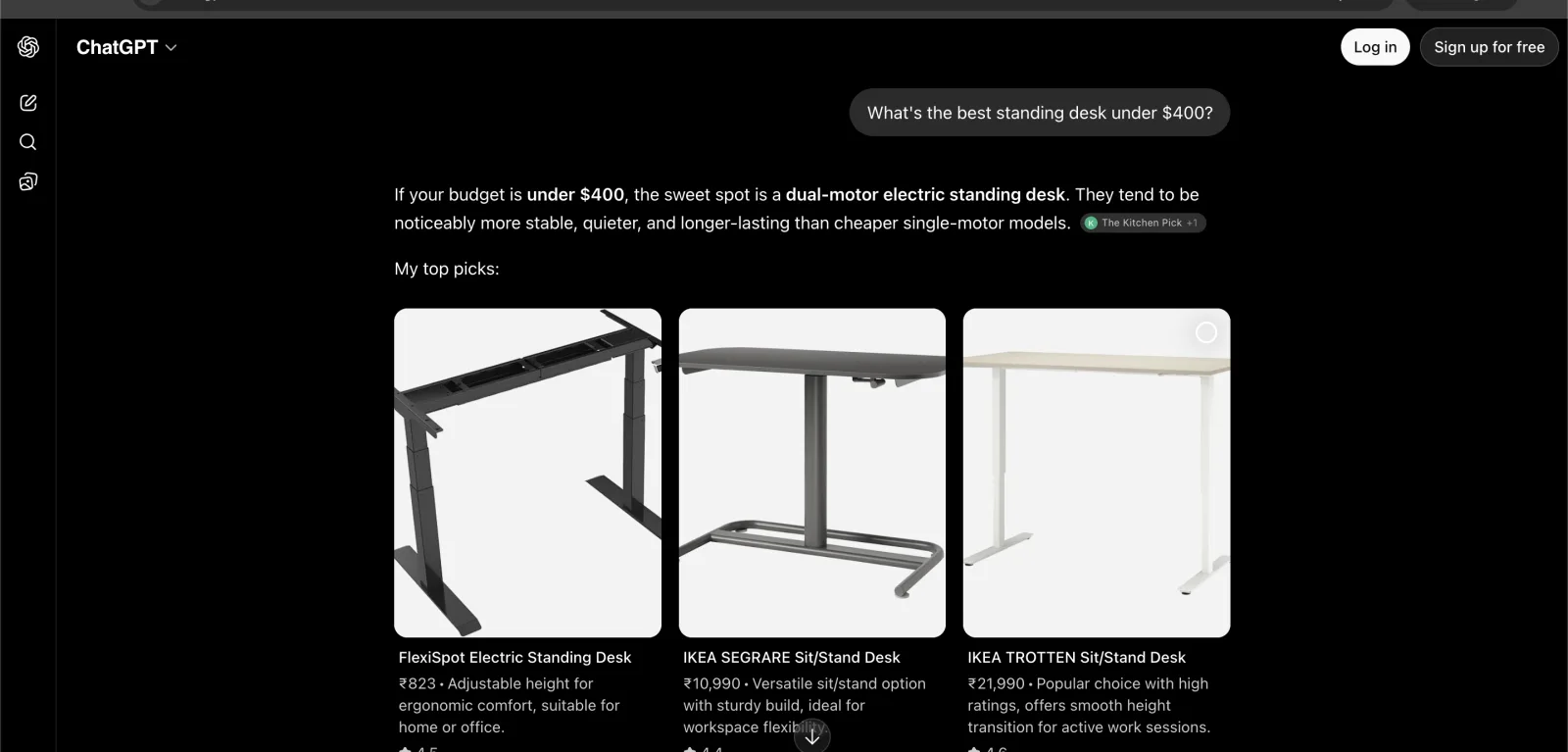
Example: ChatGPT answering a shopping query with product cards — FlexiSpot, IKEA SEGRARE, IKEA TROTTEN. AI search increasingly returns picks, not links.
You can't optimize what you can't see, so step one is simply checking where you stand:
- Run a free scan at FixAEO — see whether AI engines mention your brand, get your AI Visibility Score, and find where competitors beat you. No signup, ~60 seconds.
- Then read why ChatGPT doesn't recommend your brand and what AEO actually is.
- Comparing AEO tools? See the best AEO tools in 2026 and our breakdowns vs Profound, Peec AI, and Otterly.
- Want this checked continuously? The AI rank tracker watches all nine engines daily — including a dedicated Perplexity rank tracker for the engine that won this list. Developers and agencies can pull the same rank, mention, and citation evidence through the AI rank tracking API.
FAQ
What is the best AI search engine in 2026?
For most people, Perplexity is the best dedicated AI search engine — it gives clear answers with visible citations and a clean interface. But if you already use ChatGPT, Google, or Claude, their built-in AI search is excellent and saves you switching tools. The "best" one is the one you'll actually use daily.
Is there a free AI search engine?
Yes — most have a free tier. Perplexity, ChatGPT, Google AI Mode, Microsoft Copilot, Claude, Grok, DuckDuckGo's Duck.ai, Brave, and You.com all offer free AI search. Paid plans mainly unlock more usage, faster models, and pro features — not better basic search.
What's the difference between an AI search engine and a chatbot like ChatGPT?
A chatbot answers from its training data (its "memory"), which can be outdated (every model has a knowledge cutoff date). An AI search engine retrieves live web pages first, then answers from them with citations you can verify. The distinction is fading because ChatGPT, Claude, and Gemini now all search the web — when they do, they're acting as AI search engines.
Do AI search engines cite their sources?
The good ones do. Perplexity, ChatGPT Search, Microsoft Copilot, and Gemini show clickable source links. This matters a lot: citations let you verify answers, and for businesses, being one of the cited sources is the whole game of AEO.
Are AI search engines replacing Google?
Not replacing — reshaping. Google itself is now an AI search engine (AI Overviews and AI Mode). The bigger change is behavioral: more searches end with a direct answer and no click. That's why brands are shifting attention from ranking #1 on Google to being mentioned in AI answers.
Which AI search engine is best for privacy?
DuckDuckGo's Duck.ai and Brave Search are built around privacy — anonymized queries, no chat history used for training. Kagi is a paid, ad-free engine that doesn't track you. If anonymity is your priority, start there.
Related reading
Related reading
What is AEO? Answer Engine Optimization explained
Answer Engine Optimization (AEO) means getting AI assistants to recommend your brand. Learn what AEO is, why it matters more than SEO, and how to start.
18 min readAI Search Statistics 2026: How AI Replaces Google
20+ verified, source-linked AI search statistics for 2026 — who uses AI vs Google, how fast it's growing, and the viral stats that don't hold up.
16 min read12 Best Answer Engine Optimization Tools (2026)
12 answer engine optimization tools compared — engines covered, entry price, free tier — with honest takes on which to pick by stage and budget.
19 min read12 Best AI SEO Agents for 2026: What They Actually Automate (and What They Don't)
A sourced look at 12 real AI SEO agents for 2026 — technical fixers, content generators, and visibility-action tools — with honest autonomy verdicts, plus one 'agent' that just buys ChatGPT ads.
62 min readAEO vs SEO: what changed and what to do about it
AEO vs SEO in 2026: AI answers and search engines reward different signals. The data, a plain comparison, and a 30-day migration plan your SEO team can run.
17 min readHow to get cited by Perplexity: a 2026 playbook
Perplexity cites 4-8 sources per answer and the patterns are learnable. Here are the 8 patterns we see in cited content, with the tactics that got FixAEO cited in our own category.
16 min read
Free AEO tools
Put this into practice with free FixAEO tools — no signup required.
AI Visibility Checker
Score your brand across 9 AI engines
AEO Audit Tool
Answer-engine readiness scan
Schema Generator
Build valid JSON-LD structured data
llms.txt Generator
Create a spec-compliant llms.txt
Sitemap Validator
Check your XML sitemap for errors
AI Content Grader
Grade content for AI citation readiness
Find the gap. Then fix it.
Check how AI engines find, describe, and cite your site. Free, no signup. On a paid plan, AI Marketer can turn the evidence into briefs, drafts, optimizations, and reports.