Can Claude Search the Web? How to Enable It (2026)
Yes. Enable Claude web search in three steps, fix a missing toggle on Team or Enterprise, and learn when Claude searches and cites the live web.

On this page

Short answer: yes. Claude can search the web, it does it live, and it shows you the sources it used. If you remember a version of Claude that politely told you its knowledge stopped at a certain date, that Claude is gone. The one you're using today can go look something up on the live internet.
| What you need to know | Current answer |
|---|---|
| Availability | Web search is available on Claude's free and paid plans |
| Turn it on | Open the + / tools menu beside the prompt and enable Web search |
| Search provider | Brave is strongly evidenced, but Anthropic has not publicly confirmed it |
| Deeper research | Research is separate and available on paid plans |
| Developers | The Claude API and Claude Code support web search; results include citations |
Reviewed September 13, 2026 against Anthropic's web-search, Research, API, crawler, and help documentation. Product screenshots in this guide show the controls and cited-answer flow tested by FixAEO.
How to enable web search in Claude
On Claude for web or desktop:
- Open a new chat and click the + button in the lower-left corner of the message box.
- Select Web search from the menu.
- Check that a tick appears beside Web search, then ask your question. Add “Search the web” to your prompt when you want to make the instruction explicit.
That is the full setup for Free, Pro, and Max accounts. On a Team or Enterprise account, an Owner or Primary Owner must first enable Web search under Organization settings → Capabilities. If the option is missing for a workspace member, ask the owner to check that organization-level setting; individual members cannot override it.
You can turn search off from the same + menu. Search and web fetch count toward usage limits, which matters most on free accounts. Anthropic keeps the current steps and supported-model list in its web-search help guide.
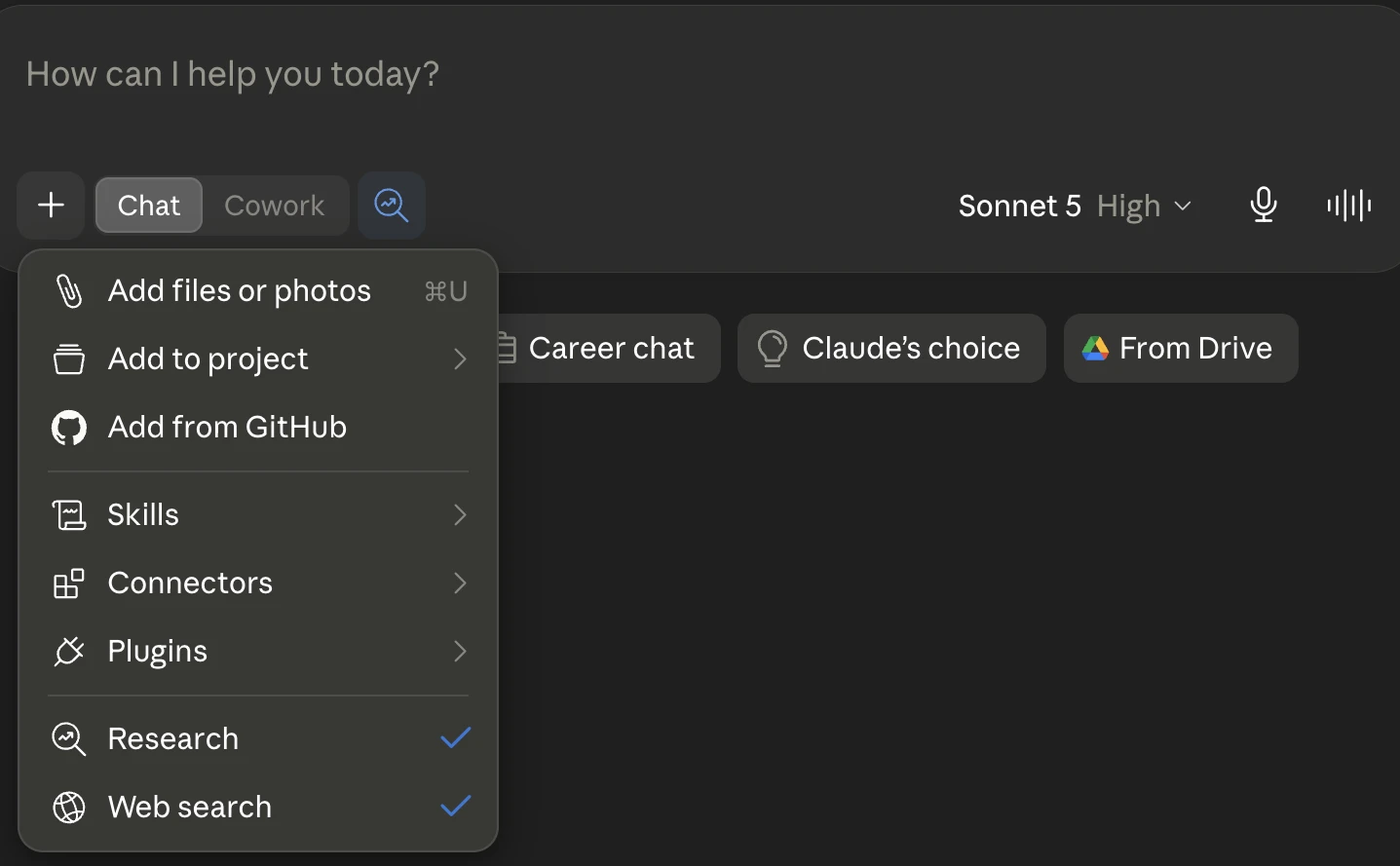
Open the + menu under the message box and select Web search. A checkmark confirms it is on. Research, the deeper mode, appears in the same menu on paid plans.
But "Claude can search the web" hides several other questions: what is Claude actually searching, how does it decide when to search, can Claude Code do it too, and — if you run a website — how do you get your page into its answers. Let me take them in order.
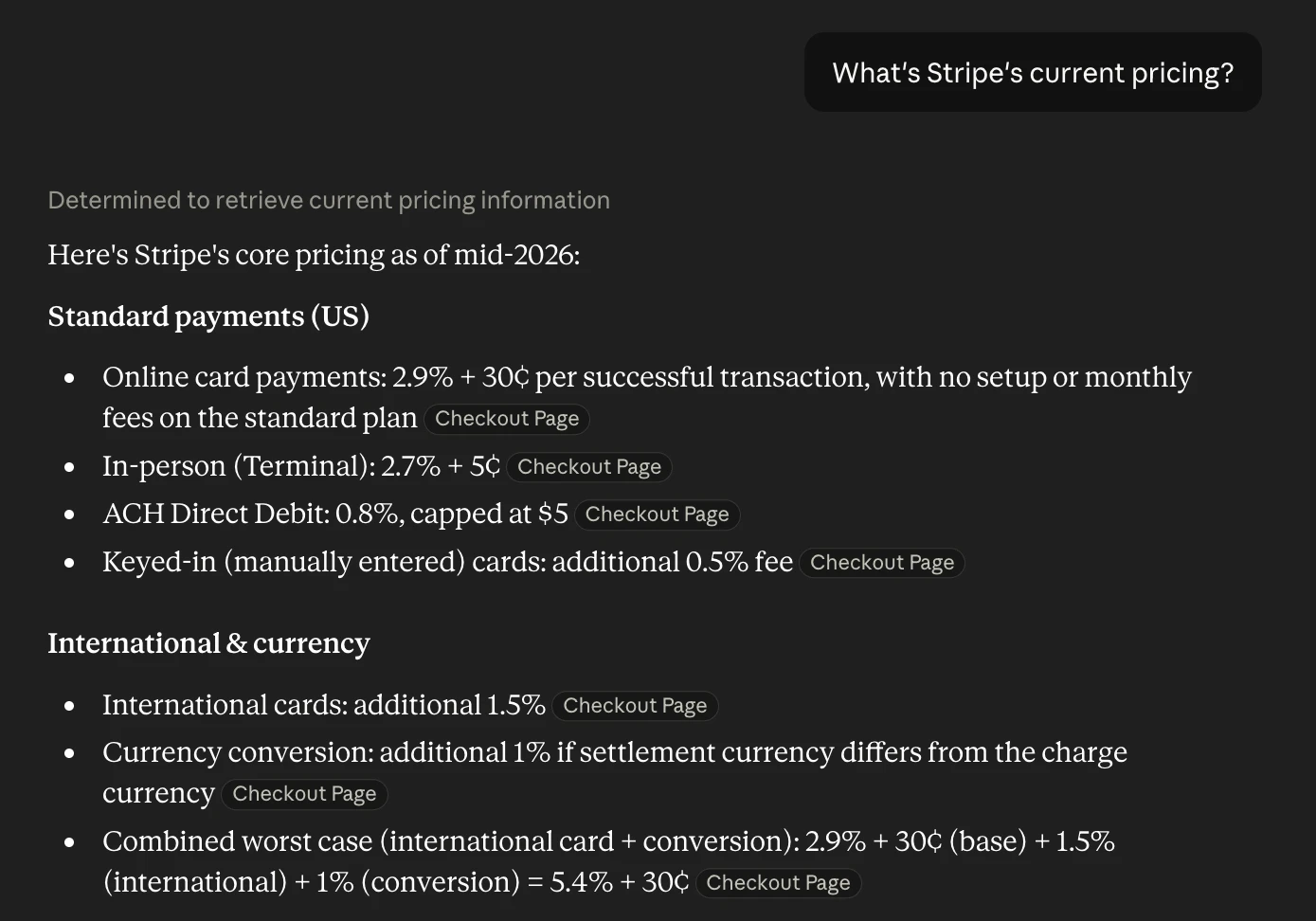
Claude with web search on: it runs a live search, then writes the answer with each figure cited inline — the tags are clickable links to the sources it used.
Curious how your site does?
See how AI engines describe your site — free, about 60 seconds, no signup.
What search engine does Claude use?
This is the part most write-ups skip, and it's the most interesting. Claude does not appear to run Google in the background. The evidence points to Brave Search.
Worth being precise here, because nobody else is. Two things are plain fact: Brave Search sits on Anthropic's published subprocessor list (added in March 2025), and Claude's web-search API carries a BraveSearchParams parameter. On top of that, when people put the two side by side, Claude returns the same citations Brave does, and TechCrunch reported the connection in March 2025. What Anthropic has never done is officially name a web-search provider. So the honest phrasing is: almost certainly Brave, strongly evidenced, but not confirmed.
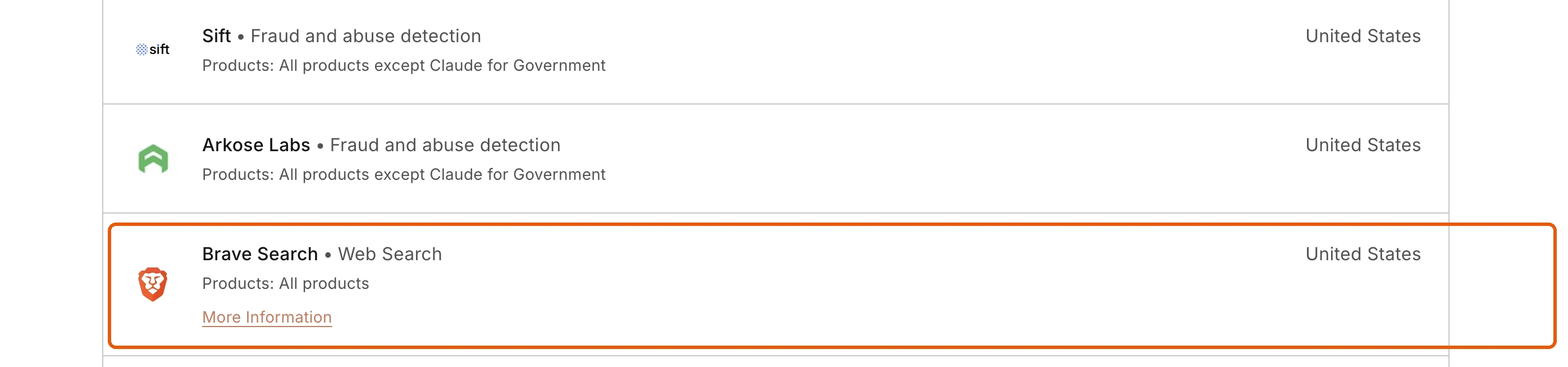
The receipt: Anthropic's own Trust Center lists Brave Search as a "Web Search" subprocessor for "all products."
That matters, because Brave runs its own independent index, now north of 40 billion pages, built without leaning on Google's or Bing's results. Two things follow. First, Claude's view of the live web is Brave's view, not Google's, so a page that ranks well on Google is not guaranteed to surface for Claude. Second, Claude only reaches for search when it decides the question needs fresh information; plenty of answers still come straight from its training data, frozen at its knowledge cutoff. Knowing which mode you're in matters.
How Claude's web search actually works
Claude doesn't search every time you ask something. Web search is a tool it decides to reach for, and understanding that decision is the whole game.
Here's the loop. You ask a question. Claude judges whether its training data can answer it or whether the question needs something current — a price, a release date, this week's news, a library's latest docs. If it decides it needs fresh information, it writes its own search queries, gets results back (from Brave's index, reportedly), reads the pages, and writes an answer with the sources cited inline. You see a "Searched the web" step while it happens, and the finished answer carries source links and short quotes so you can check its work.
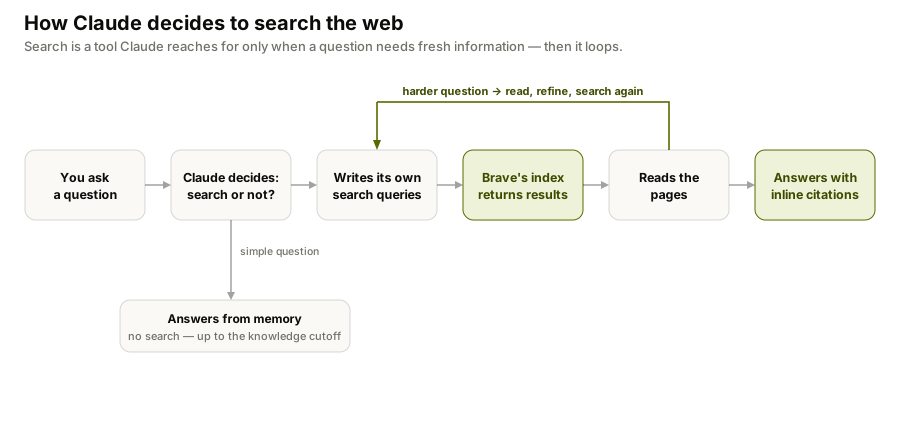
The important part is that this is agentic, not a single lookup. For a harder question Claude can run several searches in a row, each one shaped by what the last one turned up — search, read, refine, search again. That's why it can answer a layered question ("what changed in X's pricing since their last funding round") rather than just pasting the top result.
The flip side: because Claude decides on its own, it sometimes answers from memory when you wanted it to search. If freshness matters, say so — "search the web for this" makes the choice for it.
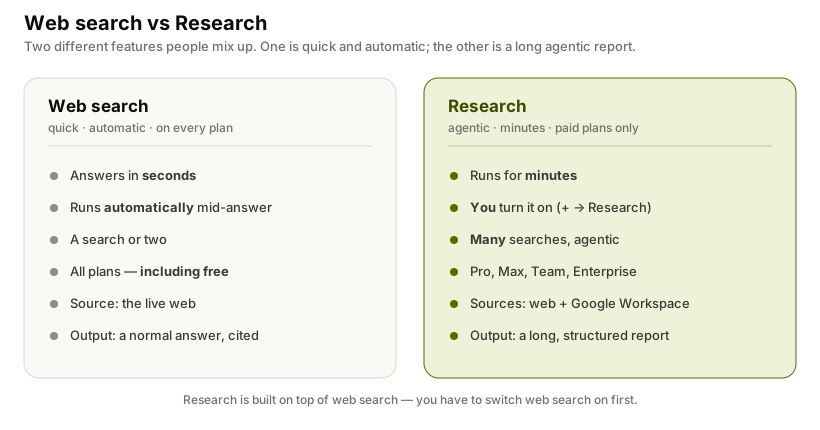
Web search vs "Research": two different features
There are actually two things here, and people mix them up.
Web search is the quick, automatic one described above — Claude runs a search or two mid-answer and replies in seconds.
Research is a separate, heavier mode. Turn it on and Claude works agentically for minutes, running many searches that build on each other, deciding what to investigate next, and pulling from your connected Google Workspace as well as the web, then hands back a longer, structured report with citations throughout. It's built for the questions where you'd otherwise open twenty tabs.
The practical differences: Research is on paid plans (Pro, Max, Team, Enterprise), across Claude on web, desktop, and mobile, and it requires web search to be enabled first — it sits on top of the same search capability rather than replacing it. For a quick fact, plain web search is faster; for a "map the whole landscape for me" task, Research is the one you want.
Claude web search settings by account type
For most people Claude web search is a single switch, though where the switch lives depends on your account. (Anthropic's own help center is the source of truth here, since the UI moves.)
Individual accounts
Open Claude.ai, click the + button (or the tools/slider icon) at the left of the message box, and switch on Web search — a check appears next to it. After that Claude searches on its own whenever a question calls for it. To run the deeper Research mode, open the same + menu and pick Research (it's on the paid plans, and a blue indicator shows when it's active).
On the phone app it's the same switch: tap +, then flip on Web search in the Add to Chat sheet.
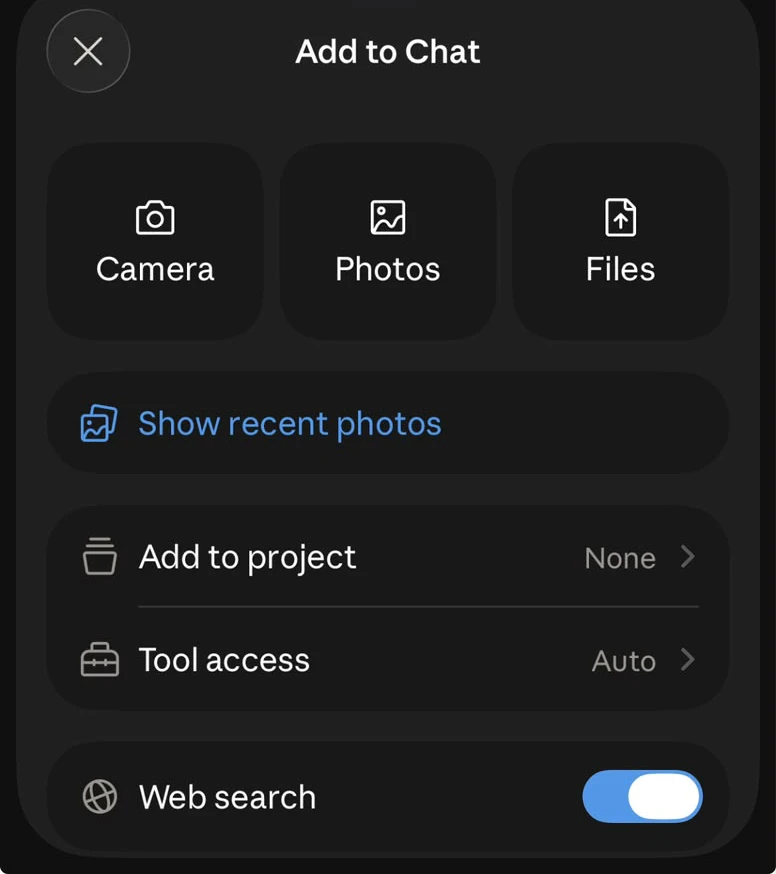
Same on mobile: the Web search toggle sits at the bottom of the Add to Chat sheet.
Team and Enterprise
An Owner or Primary Owner has to enable web search for the whole workspace first, under Admin settings → Capabilities. Once that's done, any member can switch it on for a chat from the + button in the lower-left of the chat input.
Web search is available on free and paid plans. If it is missing from an individual account, confirm that you are using one of the models listed in Anthropic's current help guide and reload Claude. On Team or Enterprise, the organization-level capability is the first setting to check. Free-account searches and page fetches count toward usage limits.
Claude web search for developers: API, Claude Code, and MCP
If you build on Claude, web access isn't limited to the chat app.
Claude Code has its own web search tool, and so does the Claude API. The API exposes two server-side tools: the web_search tool, which lets Claude run its own searches, and a web_fetch tool, which pulls the full content of a specific URL already in the conversation. Both run on Anthropic's side — you just declare the tool — and both return citations with every web-sourced fact, so you can trace where an answer came from. On the current models the tools even filter results with code before they hit the context window, which keeps answers tighter.
Two controls matter if you're wiring this into a product:
allowed_domains/blocked_domains— restrict Claude to (or away from) specific sites. Useful for a support bot that should only cite your own docs, or a research agent that must avoid a competitor.max_uses— cap how many searches Claude runs per request, so an agent can't loop up your bill.
Claude can also reach web search over MCP, and Claude Code's built-in search is why it can pull a library's current docs mid-task instead of guessing from stale training data. One caveat worth knowing: the hosted web-search tool isn't available on every platform — notably it isn't offered through Amazon Bedrock — so check availability if you deploy Claude via a cloud provider.
Claude vs ChatGPT, Gemini, Perplexity: who reads what
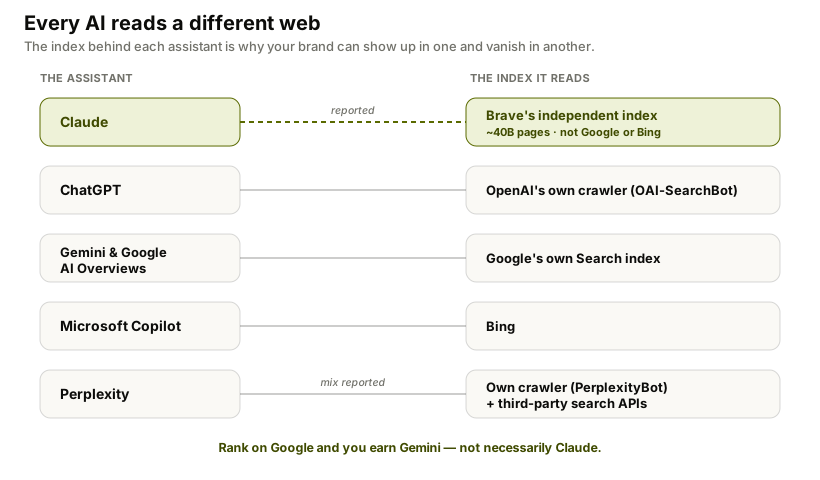
Every AI assistant "searches the web," but they don't read the same web. The index behind each one is different, and that's the single biggest reason your brand can show up in one and vanish in another.
| AI tool | Reads from | How sure are we? |
|---|---|---|
| Claude | Brave's independent index (reportedly) | Reported — Brave is on Anthropic's subprocessor list, but Anthropic hasn't named a provider |
| ChatGPT | OpenAI's own crawler (OAI-SearchBot), plus other sources | Own crawler confirmed; historical Bing ties, current mix not fully disclosed |
| Gemini / AI Overviews | Google's own Search index | Confirmed by Google |
| Copilot | Microsoft's Bing index | Confirmed by Microsoft |
| Perplexity | Its own crawler (PerplexityBot) plus third-party search APIs | Own crawler confirmed; the exact hybrid mix is reported |
The takeaway: there is no single "AI search" you can optimize for once. Google's index feeds Gemini and AI Overviews; Bing feeds Copilot; Claude appears to read Brave; ChatGPT and Perplexity largely crawl their own. Ranking on Google earns you Gemini, not necessarily Claude. If you want the full picture of who's who, I compared them in the best AI search engines.
What this means if you have a brand
Here's the part that should make you sit up. Every time Claude searches the web and cites a source, that's a slot. Someone's page gets named in the answer. The question is whether it's yours or a competitor's.
This is the whole idea behind Answer Engine Optimization: old SEO got you ranked in a list of links, but Claude doesn't show a list, it shows an answer with a handful of citations. If you're not one of them, you're invisible. And because Claude reads through Brave's index, not Google's, the gap is sharper than people expect: you can sit at the top of Google and still never appear in Claude.
Let Claude's crawlers reach you
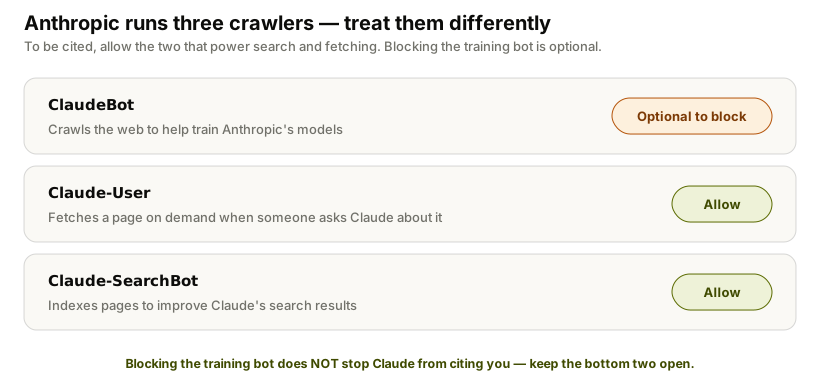
Before anything else, make sure you're not accidentally locked out. Anthropic runs three separate web crawlers, and they do different jobs:
ClaudeBot— crawls the web to help train Anthropic's models.Claude-User— fetches a page on demand when someone asks Claude about it.Claude-SearchBot— indexes pages to improve Claude's search results.
They're controlled independently in robots.txt, and here's the nuance most sites get wrong: if you want to appear in Claude's answers, you should allow Claude-User and Claude-SearchBot — even if you choose to block ClaudeBot from training on your content. Blocking the training crawler doesn't stop Claude from citing you; blocking the search and fetch crawlers does.
# Let Claude discover and cite your pages
User-agent: Claude-SearchBot
Disallow:

User-agent: Claude-User
Disallow:

# Optional: opt out of AI *training* only, while staying citable
User-agent: ClaudeBot
Disallow: /
(An empty Disallow: means "allowed." Older references mention an anthropic-ai agent — that token is deprecated; Claude-User is the current one.) If you need to verify that a bot hitting your server is really Anthropic's, they now publish an IP allowlist at claude.com/crawling/bots.json — match against that rather than hard-blocking IP ranges, which Anthropic warns is unreliable.
Then earn the citation
Access is table stakes; getting picked is the real work. In practice Claude seems to favor sources it can defend — clear, well-structured, genuinely useful pages — over sources that merely rank. Because it reads Brave's index, being present and well-regarded there likely helps too, not just on Google. I broke down the specifics in how to get cited by Claude.
The honest problem is you can't improve what you can't see. Ranking on Google tells you nothing about whether Claude names you, because they're reading different indexes. The only way to know is to ask Claude your buyers' questions and watch who it cites, repeatedly, because the answer drifts. That's what we built FixAEO to do: it runs those questions through major AI search engines and tracks who gets cited. You can run the free AI visibility scan to see where you stand, use the evidence-safe Claude prompts workflow to analyze exported results, review how the scoring works, or pull the same data into your own dashboard with the rank tracking API.
Claude searching the web is good news for the underdog. A small, sharp, well-sourced page can show up next to the big incumbents. But only if you know it's happening and write for it.
FAQ
Can Claude search the internet?
Yes. With web search enabled, Claude searches the live internet, reads the results, and cites them in its answer. Without it, Claude answers from training data only, up to its knowledge cutoff. It decides on its own when a question needs a live search.
What search engine does Claude use?
Almost certainly Brave Search, though Anthropic has not confirmed it publicly. Brave appears on Anthropic's subprocessor list, the Claude API carries a BraveSearchParams parameter, and Claude's web citations match Brave's results. For web results the evidence points to Brave's independent 40-billion-page index rather than Google or Bing.
Is Claude's web search free?
Yes. After a staged 2025 rollout, web search is available on free Claude.ai accounts, not just paid ones, though it reached some free users and regions later than paying US users. On free plans, searches count toward your daily usage limits. The deeper Research mode, however, is paid-only (Pro, Max, Team, Enterprise).
How do I turn on web search in Claude?
On an individual account, open Claude.ai, click the slider icon in the dropdown next to the chat input, and toggle on Web search. On Team or Enterprise, an Owner enables it under Admin settings then Capabilities, after which members switch it on from the + button in a chat. Anthropic's help center has the current steps.
What's the difference between Claude's web search and Research?
Web search is quick and automatic — Claude runs a search or two mid-answer and replies in seconds. Research is a heavier, agentic mode that runs many searches over several minutes, pulls from the web and your Google Workspace, and returns a longer cited report. Research is paid-only and requires web search to be on.
Can I force Claude to search the web?
Yes. Claude decides on its own when a question needs current information, but if it answers from memory and you wanted live results, just tell it — "search the web for this" or "check current sources" makes it run a search. Turning web search on in settings is the prerequisite; the phrasing nudges the decision.
How do I let Claude cite my website?
Allow Anthropic's Claude-SearchBot and Claude-User crawlers in your robots.txt (you can still block ClaudeBot from training if you prefer — that doesn't affect citations). Then make the page genuinely useful and well-structured, since Claude favors sources it can defend. Because Claude appears to read Brave's index, being present there helps too. See how to get cited by Claude for the full playbook.
Does Claude Code have web access?
Yes. Claude Code has a built-in web search tool, as does the Claude API (the web_search tool, a web_fetch tool for specific URLs, and web search over MCP). Every web-sourced answer carries citations, and you can scope searches with allowed_domains / blocked_domains. That lets the agent fetch current documentation and facts during a task instead of relying only on its training data.
Related reading
Can ChatGPT Search the Web? How to Use Search
Yes, ChatGPT can search the live web and cite sources. Follow the current Search steps, fix a missing Search option, and verify cited answers.
22 min readCan Gemini Search the Web? How to Use Google Search
Yes, Gemini can use Google Search, show sources, and run Deep Research. Follow the steps to request current results and verify every citation.
20 min readHow LLMs Actually Work — and Why It Decides Whether AI Recommends Your Brand
How does ChatGPT decide what to say about your brand? A plain-English guide to next-token prediction, retrieval, and why answers change every time.
26 min readHow to get cited by Claude: the 2026 playbook
Get cited by Claude with the 2026 AEO playbook. Claude's constitutional training favors authoritative, non-promotional sources — here's how to qualify.
17 min read20 Claude Prompts for AI Search Visibility (With Workflow)
20 copy-paste Claude prompts to analyze real AI-search exports, improve pages, and track citations without asking Claude to simulate other engines.
65 min readBest AI Search Engines in 2026: I Tested All 15
I tested 15 AI search engines for a month — Perplexity, ChatGPT, Gemini, Claude, Grok and more. An honest ranking of which to use and what each does best.
37 min read
Free AEO tools
Put this into practice with free FixAEO tools — no signup required.
AI Visibility Checker
Score your brand across 9 AI engines
AEO Audit Tool
Answer-engine readiness scan
Schema Generator
Build valid JSON-LD structured data
llms.txt Generator
Create a spec-compliant llms.txt
Sitemap Validator
Check your XML sitemap for errors
AI Content Grader
Grade content for AI citation readiness
Find the gap. Then fix it.
Check how AI engines find, describe, and cite your site. Free, no signup. On a paid plan, AI Marketer can turn the evidence into briefs, drafts, optimizations, and reports.